Clean Architecture: Building Software that Endures
A comprehensive guide to Clean Architecture explained in human language: what each layer is, how they integrate, when to use them, and why it matters for your business.
Table of Contents
Imagine you’re building a house. You don’t start by placing furniture and then deciding where the walls will go. First, you establish the foundation, then raise the structure, then install plumbing and wiring, and only at the end do you place furniture and decoration. If in five years you decide to change the kitchen, you don’t have to demolish the entire house. If you want to change the wall color, you don’t need to redo the plumbing.
This is precisely the idea behind Clean Architecture: building software so that important decisions are protected from less important ones. So you can change your database without rewriting your business logic. So you can change your web framework without touching the rules that define how your company works. So you can test your system without needing to start a server, a database, or any complex infrastructure.
I’ve seen projects collapse under their own weight. Applications where changing a small interface detail requires modifying dozens of files in seemingly unrelated places. Systems where adding a new feature takes weeks because everything is so intertwined that each change breaks something elsewhere. Companies that have to completely rewrite their software every few years because it became impossible to maintain.
Clean Architecture is not a silver bullet. It won’t magically solve all your problems. But it’s a set of principles that, when understood and applied correctly, result in software that can evolve with your business instead of becoming an obstacle to it.
The Core Philosophy: Dependencies Point Inward
Before talking about layers, components, or any technical details, you need to understand the fundamental principle that sustains all clean architecture. It’s simple, but profound: dependencies always point inward, toward business rules.
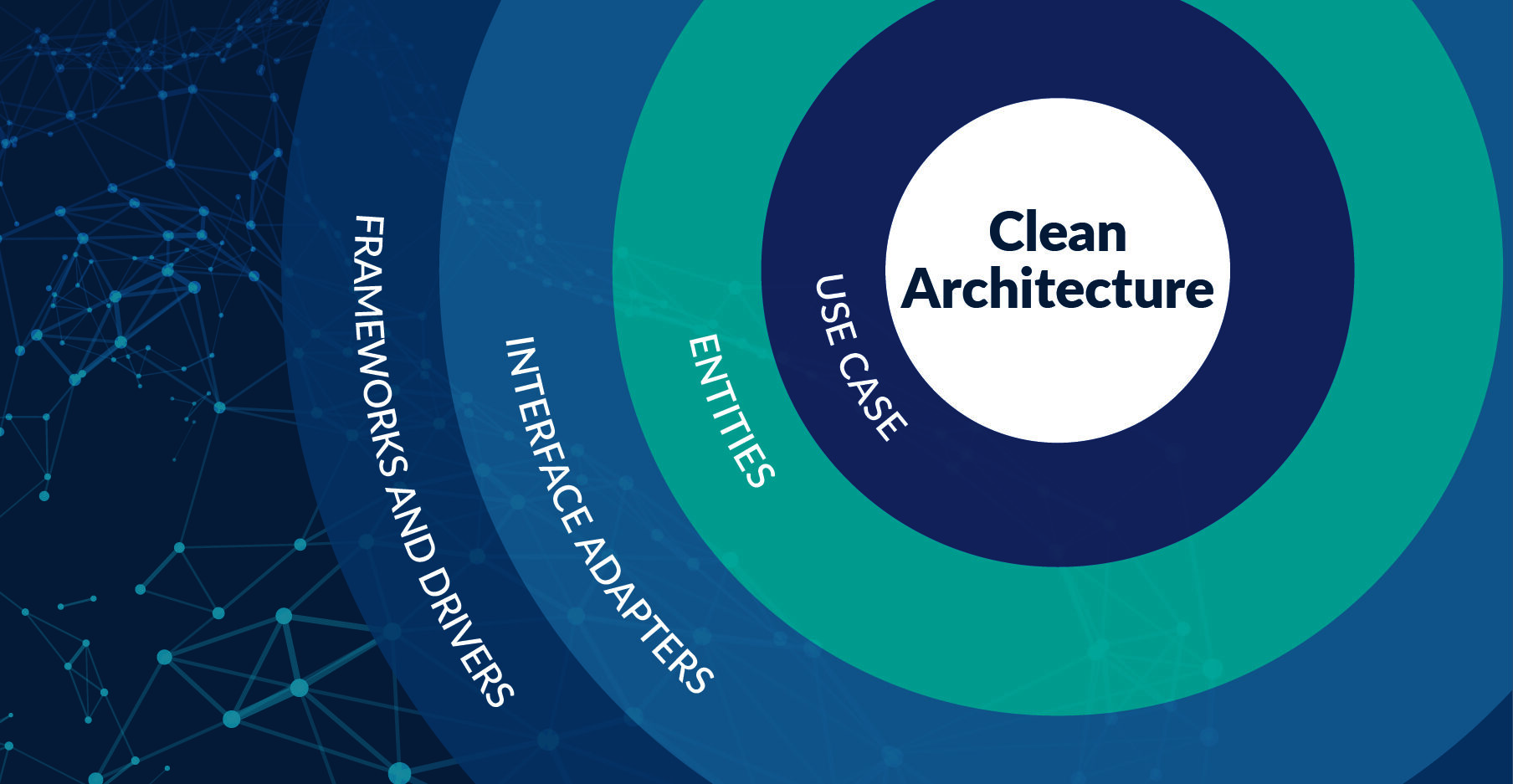
Think of it as concentric circles. At the center is the most important thing: the rules that define your business. These rules would exist even if you didn’t have an application. If you run a bookstore, you have rules about how to manage inventory, how to process sales, how to handle returns. These rules are independent of whether you use a web application, a mobile application, or simply paper and pencil.
As you move away from the center, the layers become more specific about how you implement those rules. But here’s the crucial part: outer layers know and depend on inner layers, but inner layers know nothing about outer ones. Your business logic doesn’t know if it’s being used by a web application, a mobile application, or a command-line script. It doesn’t know if your data is in PostgreSQL, MongoDB, or text files. It doesn’t care.
This inversion of dependencies is what makes the system flexible. When your business rules don’t depend on implementation details, you can change those details without affecting what really matters. You can migrate from one database to another, change frameworks, or even completely rewrite your user interface, and your business rules remain intact.
“Good architecture allows you to postpone decisions about frameworks, databases, and web servers until you have enough information to make them correctly”
Most projects start backwards. They choose the database first, then the framework, and build all their business logic coupled to these technical decisions. When they need to change something, it’s like trying to replace the foundation of a house while people are living in it.
The Four Layers: A Visual Guide
Clean Architecture typically consists of four concentric layers. Each has a specific purpose and clear rules about what it can and cannot do. Let’s explore each one, from outside to inside, to understand how they integrate.
Layer 1: Frameworks and Drivers (The Outermost Layer)
This is the layer where all technical details that could change live. Think of it as the facade of your building: important for user experience, but it can be renovated without affecting the internal structure.
What lives here?
- Your web framework (React, Angular, Vue, or whatever you use)
- Your specific database (PostgreSQL, MySQL, MongoDB)
- External services (third-party APIs, email services, cloud storage)
- Input/output devices (console, files, sockets)
What does this layer do? This layer handles communication with the outside world. It receives HTTP requests, reads and writes to databases, sends emails, interacts with external services. Everything that requires specific infrastructure lives here.
A concrete example: Imagine you’re building a library management system. In this layer you would have:
- Web controllers that receive requests when someone searches for a book
- Code that actually connects to PostgreSQL and executes SQL queries
- Integration with an email service to send notifications
- Code that communicates with a payment API to charge fines
Why this separation matters: One day you decide PostgreSQL is too expensive and want to migrate to MySQL. If your system is well architected, you only change code in this layer. Your business rules don’t know. Or you decide that instead of a web application you want a mobile application. You create a new frameworks layer for mobile, but the inner layers remain identical.
Layer 2: Interface Adapters (Gateways, Presenters, Controllers)
This layer is the translator between the outside world and your business logic. It takes data in the format it comes from the outside world and converts it to the format your business logic needs, and vice versa.
What lives here?
- Controllers that receive requests and translate them into use cases
- Presenters that take use case results and format them for the UI
- Gateways that define interfaces for accessing data
- Converters that transform between different data formats
What does this layer do? Think of this layer as an interpreter. Your business logic speaks in terms of domain concepts: “User”, “Book”, “Loan”. Your database speaks in terms of tables, columns, and rows. Your REST API speaks in terms of JSON, HTTP headers, and status codes. This layer translates between these different languages.
A concrete example: When a user of your library searches for a book:
- A controller receives the HTTP request with the search term
- The controller creates a request object that your use case can understand
- Calls the “Search Books” use case with this object
- The use case returns a list of domain books
- A presenter takes that list and converts it to JSON for the HTTP response
Why this separation matters: Your business logic doesn’t know what JSON is, nor HTTP, nor SQL. It works with pure domain objects. This means you can test it without starting a web server. You can change from REST to GraphQL without touching your logic. You can add a command-line interface without duplicating code.
Layer 3: Use Cases (Application Logic)
Use cases represent the specific operations your application can perform. They are the verbs of your system: “Lend a book”, “Register a new user”, “Process a return”, “Calculate late fees”.
What lives here?
- The specific operations your application supports
- The orchestration of how domain entities are used
- The rules about when and how operations are performed
- The coordination between different parts of the system
What does this layer do? Use cases take the fundamental rules of your business (which live in the inner layer) and orchestrate them to achieve specific goals of your application. Each use case is a story of what a user can do with your system.
A concrete example: The “Lend a Book” use case might work like this:
- Receives a request with the user ID and book ID
- Gets the user from the repository (without knowing if it’s database, API, or file)
- Verifies that the user has no pending fines
- Gets the book from the repository
- Verifies that the book is available
- Creates a new “Loan” entity using domain rules
- Saves the loan
- Updates the book status
- Schedules a return notification
- Returns the result
Note that the use case doesn’t know anything about HTTP, SQL, or any technical details. It only orchestrates the logic.
Why this separation matters: Use cases encapsulate your application’s intentions. They are living documentation of what your system can do. You can understand them without knowing programming. You can test them in isolation. And you can reuse them: the same “Lend a Book” use case works from your web application, your mobile application, or a nightly batch process.
Layer 4: Entities (Domain Business Logic)
This is the innermost layer, the heart of your system. Here live the fundamental rules of your business, those that wouldn’t change even if you completely rewrote your application.
What lives here?
- Your business’s core entities
- The fundamental rules that must always be met
- The domain concepts that give meaning to everything
- The logic that would exist even without an application
What does this layer do? Entities represent the fundamental concepts of your business and encapsulate the most critical rules. They don’t worry about specific use cases of the application, but about maintaining overall business integrity.
A concrete example: In your library system, the “Book” entity might have rules like:
- A book cannot be lent to two people at once
- A book has a limited number of allowed renewals
- Certain reference books cannot leave the library
The “User” entity might have rules like:
- A user cannot have more than 5 books on loan simultaneously
- A user with pending fines cannot make new loans
- Students have a different loan period than professors
These rules are independent of how you implement your system. They are business truths.
Why this separation matters: These entities are the most stable part of your system. They can live for decades without significant changes. When well designed, they can be reused in multiple applications. If you decide to create a mobile application in addition to your web one, these entities are reused as is. If you migrate from a monolith to microservices, these entities can live in a shared package.
Data Flow: How Layers Interact
Understanding layers individually is important, but what’s crucial is understanding how data flows through them. Let’s follow a complete request from when it arrives until it’s responded to.
Practical Case: A User Searches for Available Books
Step 1: The Request Arrives (Frameworks Layer)
A user opens your web application and types “Clean Architecture” in the search box. Their browser sends an HTTP GET request to your server: /api/books/search?query=Clean+Architecture
Your web framework (Express, Spring, Django, or whatever you use) receives this request. At this point, you’re in the outermost layer. You have a Request object specific to HTTP with headers, query parameters, cookies, etc.
Step 2: The Controller Translates the Request (Adapters Layer) A controller in the adapters layer receives this HTTP request and does its translation work:
Input: HTTP request with query parameters
Output: Simple object with the search to perform

The controller extracts: "Clean Architecture"
Creates an object: { searchTerm: "Clean Architecture" }
This object has nothing to do with HTTP. It’s just pure data that anyone can understand. The controller might also validate basic data: Is the search term not empty? Does it not have dangerous characters?
Step 3: The Use Case Executes (Use Cases Layer) The controller invokes the “Search Available Books” use case passing it that simple object. The use case does its orchestration:
1. Receives the search term
2. Calls the books repository (an interface, not an implementation)
3. Asks: "Give me all books matching this term"
4. Receives a list of Book entities
5. Filters only those that are available (using entity rules)
6. Orders by relevance
7. Returns the resulting list
Note that the use case doesn’t know how books are searched for. It only knows there’s a repository that can do it. It also doesn’t know how results will be presented. It only returns domain entities.
Step 4: The Gateway Accesses Data (Adapters Layer) When the use case asks the repository for books, it’s talking to an interface defined in the use cases layer. But the actual implementation lives in the adapters layer.
The use case calls: repository.findByTitle("Clean Architecture")
The interface defines: "Returns a list of Books"
The implementation (in adapters):
  - Connects to PostgreSQL
  - Executes: SELECT * FROM books WHERE title LIKE '%Clean Architecture%'
  - Converts SQL rows into domain Book objects
  - Returns the list to the use case
This implementation knows SQL, PostgreSQL, how to map between tables and objects. But the use case knows nothing about that. It just asked for books and received them.
Step 5: The Database is Accessed (Frameworks Layer) The repository implementation uses a database-specific driver (psycopg2 for Python, JDBC for Java, pg for Node.js) to execute the query. This code lives in the outermost layer because it depends on specific technology.
Step 6: Results are Presented (Adapters Layer) The use case returns a list of Book entities to the controller. The controller passes these entities to a presenter, whose job is to format the data for the HTTP response:
Input: List of domain Book objects
Each book has: title, author, ISBN, status, location, etc.

Output: JSON object for HTTP response
Only includes: title, author, cover, availability
Formats dates to ISO 8601 format
Generates URLs for covers
Step 7: The Response is Sent (Frameworks Layer) Finally, the web framework takes the JSON from the presenter and sends it as an HTTP response with appropriate headers, status code 200, etc.
The Reverse Flow: Saving Data
When you need to save data, the flow is similar but inverted:
- The HTTP request arrives with data to save
- The controller validates and translates the input data
- The use case orchestrates creation/update using domain entities
- Entities validate that business rules are met
- The use case asks the repository to save the data
- The gateway converts entities to database format
- The data is persisted
- The result goes up through the layers until it becomes an HTTP response
Interface Separation: The Power of Not Knowing
One of the most powerful and often most confusing concepts of Clean Architecture is how inner layers define interfaces that outer layers implement. This sounds backwards from what you’d normally expect, but it’s crucial.
How it Normally Works (without Clean Architecture)
In most code, if your logic needs to access data, it directly imports the class that accesses the database:
Your business logic says:
"I need to get a user"
Imports: PostgreSQLUserRepository
Calls: postgresRepo.getUserById(123)

Problem: Your logic now depends on PostgreSQL
If tomorrow you want to change to MySQL, you have to modify your business logic. If you want to test your logic, you need a real database running.
How it Works with Clean Architecture
In Clean Architecture, your business logic defines an interface that describes what it needs, but not how to obtain it:
Your business logic defines:
"I need something that can get users by ID"
Defines an interface: UserRepository with method getUserById(id)

Your logic uses: repository.getUserById(123)
Regardless of how it's actually implemented
Then, in an outer layer, you implement that interface:
PostgreSQLUserRepository implements UserRepository:
  - Connects to Postgres
  - Executes the SQL query
  - Converts the result to a domain User object
  - Returns it

If tomorrow you want MySQL:
  - Create MySQLUserRepository that implements the same interface
  - Your business logic doesn't change a single line
Why This Changes Everything
This inversion of dependencies gives you superpowers:
Trivial Testing: You can create an in-memory implementation for tests that simply stores data in a dictionary. Your tests run in milliseconds without needing databases, Docker, or infrastructure.
Changes Without Fear: You can experiment with different databases, different cloud providers, different external services, all without touching your business logic.
Parallel Development: The backend team can start working on business logic by defining interfaces, while another team implements infrastructure details. They don’t need to wait for each other.
Real Reusability: Your business logic can be used from multiple applications, platforms, or contexts, because it’s not tied to any specific technology.
When You Need Clean Architecture
Clean Architecture is not for every project. Like any powerful tool, it has a cost. It requires more code, more files, more layers of indirection. So when is it worthwhile?
Projects That Benefit Enormously
Long-Lived Enterprise Systems: If you’re building software you expect to maintain for 5, 10, or 20 years, Clean Architecture is an investment that pays for itself. Companies change, technologies evolve, but your business logic remains stable.
Applications with Complex Business Logic: If your value is in complicated business rules (financial, medical, logistics), you want those rules to be isolated, well-tested, and protected from technological changes.
Systems That Need Multiple Interfaces: If you need web, mobile, public API, B2B integrations, all using the same logic, Clean Architecture lets you write it once and reuse it everywhere.
Large Teams Working in Parallel: When you have multiple teams working simultaneously, the clear separations of Clean Architecture prevent them from getting in each other’s way.
Startups Seeking Investment: Smart investors value well-architected code because they know it makes the company more adaptable and less risky.
Projects Where It’s Probably Excessive
Prototypes and Validation MVPs: If you’re validating an idea and don’t know if the product will exist in three months, the overhead of Clean Architecture probably isn’t worth it. Validating quickly is more important than perfect code.
Simple Internal Scripts and Tools: A script that processes a CSV and generates a report doesn’t need four layers of architecture. That would be over-engineering.
Projects with Trivial Logic: If your application is basically CRUD (create, read, update, delete) without complex rules, Clean Architecture adds complexity without proportional benefit.
Teams That Are Learning: If your team is struggling with basic programming concepts, adding Clean Architecture on top can be overwhelming. It’s better to master the fundamentals first.
Gradual Implementation: You Don’t Have to Do It All at Once
The beauty of Clean Architecture is that you can adopt it gradually. You don’t need to rewrite your entire application overnight.
Phase 1: Separate Your Business Logic
The first and most important step is to identify and separate your actual business logic from infrastructure code. Look for the rules that define how your business works and move them to dedicated classes or modules.
Before: Your web controller does everything: validates data, applies business rules, accesses the database, formats the response.
After: Your controller only receives and responds. It delegates everything important to business services that know nothing about HTTP.
This step alone already gives you enormous benefits. You can test your logic without starting a web server. You can reuse it from other places.
Phase 2: Introduce Interfaces for Your Dependencies
The next step is to break direct dependencies. Instead of your business logic directly importing data access classes, define interfaces.
Before:
Your service imports: PostgresUserRepo
Depends directly on the implementation
After:
Your service uses: UserRepository (an interface)
Receives the implementation as a parameter
Doesn't care if it's Postgres, MySQL, or memory
This gives you flexibility to change implementations and makes testing enormously easier.
Phase 3: Organize in Clear Layers
Once you have separated business logic and defined interfaces, start organizing your code into folders/packages that reflect Clean Architecture layers.
project/
  domain/
    entities/
    business-rules/
  use-cases/
    interfaces/ (repositories, external services)
    implementations/
  adapters/
    web-controllers/
    presenters/
    data-gateways/
  infrastructure/
    database/
    frameworks/
    external-services/
This physical organization makes the architecture visible and prevents dependencies from going in the wrong direction.
Phase 4: Apply Strict Dependency Principle
Finally, ensure that dependencies only go inward. Tools can help with this:
- Linters that verify imports
- Architecture tests that fail if there are incorrect dependencies
- Code reviews focused on architecture
Common Mistakes and How to Avoid Them
I’ve seen many teams try Clean Architecture and end up with something that’s more complicated but not cleaner. These are the most common mistakes.
Mistake 1: Over-Abstracting Everything
The Problem: Creating interfaces and layers for absolutely everything, even for trivial things that will never change.
An Example:
Creating a DateProvider interface with SystemDateProvider implementation to get the current date. Yes, technically it makes the system more testable, but it’s likely excessive for most cases.
The Solution: Abstract things that have a high probability of changing or that significantly hinder testing. You don’t need to abstract every standard library call.
Mistake 2: Anemic Domain Model
The Problem: Domain entities become simple data containers without behavior. All logic ends up in use cases.
An Example:
Your Order entity only has getters and setters. All logic for calculating totals, applying discounts, validating stock, is in the CreateOrder use case.
The Solution: Domain entities should encapsulate fundamental business rules. If something is a domain invariant (a rule that must always be met), it should be in the entity.
Mistake 3: Dependencies Pointing Outward
The Problem: Inner layers import and depend on outer layers, violating the fundamental principle.
An Example: Your use case directly imports a web framework class, or your domain entity has references to database types.
The Solution: Be strict with dependencies. Use automated tools to verify that dependencies always point inward. In code reviews, this should be one of the first checks.
Mistake 4: Mapping Too Much
The Problem: Creating different objects for each layer and constantly mapping between them, generating repetitive code without real benefit.
An Example:
You have UserEntity in the domain, UserDTO in use cases, UserViewModel in presenters, UserModel in the database, all almost identical.
The Solution: Map only when there are significant differences. Domain entities can travel through several layers if they don’t need transformations. Map when you change fundamentally different contexts (domain to persistence, domain to presentation).
Mistake 5: Obsessing with Purity
The Problem: Trying to make absolutely everything pure, immutable, and perfect, to the point that the code becomes impossibly complex.
An Example: Forcing pure functional programming in an object-oriented language, or vice versa, because “it’s cleaner”.
The Solution: Clean Architecture is about organization and dependencies, not about programming paradigms. Use the strengths of your language. What’s important is that layers are well separated, not that every function is mathematically pure.
The Human Factor: Selling Clean Architecture to the Business
As an architect or senior developer, you’re probably convinced of the value of Clean Architecture. But you need to convince others: your manager, product owners, the CTO, perhaps investors. They don’t care about layers and dependencies. They care about costs, time to market, and risk.
Translating Technical Benefits to Business Language
“We can test without infrastructure” Translates to: “We reduce CI/CD infrastructure costs and accelerate the development cycle because tests run in seconds instead of minutes.”
“Low coupling between components” Translates to: “Multiple teams can work in parallel without blocking each other, accelerating development.”
“Framework independence” Translates to: “We’re not tied to a specific vendor. If our current technology becomes obsolete or too expensive, we can migrate without rewriting everything.”
“Protected business logic” Translates to: “The rules that define our product are documented in code, well-tested, and protected from accidental changes. This reduces bugs and facilitates audits.”
The Cost of Not Doing It
Sometimes, the most effective approach is showing what happens without good architecture:
Decreasing Velocity: “In our current codebase, features that took days now take weeks. Each change has unexpected effects in unrelated places. This will only get worse.”
Accumulated Technical Debt: “We’ve accumulated so many patches and workarounds that we’ll eventually need a complete rewrite. That means 6-12 months without new features, just to maintain what we have.”
Difficulty Hiring: “Good developers don’t want to work on poorly organized codebases. If we don’t improve our architecture, we’ll have problems attracting and retaining talent.”
Vendor Lock-in Risk: “We’re so coupled to [specific framework/platform] that we’re at their mercy on pricing and direction. If they decide to change terms or discontinue support, we’re in trouble.”
Showing Early Wins
Don’t try to convince with theory alone. Implement Clean Architecture in a small but visible part of the system. Then show:
- Tests that run in a fraction of the previous time
- A change that would have been complicated but was trivial
- A new feature reusing existing logic
Concrete victories convince more than any PowerPoint presentation.
Tools and Resources for Deeper Understanding
Clean Architecture is a deep topic. This article is an introduction, but there’s much more to explore.
Fundamental Reading
“Clean Architecture” by Robert C. Martin The definitive book. Martin explains not just the how but the why behind each decision. It’s dense but invaluable.
“Domain-Driven Design” by Eric Evans Perfectly complements Clean Architecture. It focuses on how to model and organize your business domain, which is the heart of clean architecture.
“Implementing Domain-Driven Design” by Vaughn Vernon More practical than Evans’ book. Shows concrete implementations and specific patterns.
Related Concepts
Hexagonal Architecture (Ports and Adapters) A concept similar to Clean Architecture, proposed earlier by Alistair Cockburn. Many consider them variations of the same theme.
Onion Architecture Another variation that emphasizes concentric layers. The name comes from visualizing it as layers of an onion.
SOLID Principles The fundamental principles of object-oriented design. Clean Architecture is an application of these principles at the architectural level.
Complementary Patterns
Dependency Injection Fundamental for implementing Clean Architecture. It allows inner layers to receive their dependencies without knowing concrete implementations.
Repository Pattern The most common pattern for abstracting data access. It defines a collection-like interface for accessing domain entities.
CQRS (Command Query Responsibility Segregation) Separates read and write operations. It can significantly simplify complex systems when combined with Clean Architecture.
Communities and Discussion
Clean Architecture concepts generate much debate. It’s good to expose yourself to different perspectives:
- Technical blogs from companies using it at scale (Spotify, Netflix, Uber)
- Software architecture conferences
- Discussion groups about DDD and clean architecture
- Code reviews of well-architected open source projects
Clean Architecture is not dogma. It’s not a recipe you follow blindly. It’s a set of principles that guide design decisions. Some projects benefit from applying them completely. Others only need some concepts. What’s important is understanding the reasoning behind each principle so you can apply them intelligently.
I’ve seen teams transform by adopting these principles. Applications that were nightmares to maintain became a pleasure to work on. Features that would take weeks were completed in days. Tests that required databases and servers ran in milliseconds.
But I’ve also seen teams apply Clean Architecture mechanically, following the forms without understanding the substance, and end up with more complex code without the benefits. Architecture is not the end, it’s the means. The end is software that can evolve with your business, that’s reliable, that’s understandable to both new and veteran developers.
Start small. Take a problematic area of your system and apply these principles. Learn what works for your team and your context. Adapt and evolve. Perfect architecture doesn’t exist, but architecture that continuously improves is invaluable.
“Architecture is about intention. Code can lie, but architecture must reveal the system’s intention”
Your code should tell a story. Someone new should be able to read your project structure and understand what your business does, what the main operations are, what rules are fundamental. Clean Architecture, when done well, makes your code self-documenting. The architecture itself communicates what matters and what’s secondary.
This is the real value: not just code that works, but code that communicates, that teaches, that can be understood and modified by people who come after you. Code that endures.
Related articles
By relevance
Design Patterns: The Shared Vocabulary of Software
A comprehensive guide to design patterns explained in human language: what they are, when to use them, how to implement them, and why they matter for your team and your business.
Software Architecture: Beyond the Code
A comprehensive guide to software architecture explained in human language: patterns, organization, structure, and how to build systems that scale with your business.

Go at Scale: Engineering Patterns from Uber, Stripe, and High-Growth Teams
Learn how large engineering teams organize Go codebases for scale. Discover Uber's monorepo strategy, dependency management, testing patterns, and workflows that handle thousands of developers.
Idiomatic Go: The mindset shift that transforms teams
A deep guide to what writing idiomatic Go means, why it is different, how to shift your thinking from object-oriented programming to interfaces, and why this makes your code better.