Git Flow Basado en Ambientes: La solución real para equipos ágiles sin caos
Una guía práctica y exhaustiva sobre cómo implementar un flujo de Git basado en ambientes para equipos ágiles multi-proyecto: gestión de QA local, Staging en Azure, automatización con GitHub Actions, y coordinación efectiva entre desarrolladores sin mezclar cambios.
Imagina un restaurante de alta cocina donde cinco chefs trabajan en platos diferentes, pero algunos ingredientes son compartidos, las recetas cambian constantemente, y hay un supervisor que necesita probar cada plato antes de que llegue al cliente. Ahora imagina que a veces un plato requiere trabajo simultáneo en tres estaciones distintas: entrada, plato fuerte y postre. Y para colmo, de vez en cuando hay una orden urgente que debe salir en minutos.
Eso es exactamente lo que sucede en un equipo de desarrollo ágil moderno trabajando con múltiples proyectos (web, backend, mobile) que deben sincronizarse, mientras QA necesita probar localmente, Staging debe reflejar cambios en Azure, y todo debe fluir sin mezclar cambios no relacionados entre desarrolladores.
Este artículo no es teoría. Es la solución práctica a un problema real que enfrentan equipos de desarrollo todos los días.
El Problema Real: Cuando Trunk-Based Development No Es Suficiente
La Situación Actual
Trabajas en un equipo con:
- 5 Desarrolladores trabajando simultáneamente en diferentes historias de usuario
- 1 QA que necesita probar cambios en un ambiente local antes de aprobar
- 1 Scrum Master coordinando sprints de 2 semanas
- 1 Product Owner priorizando y validando funcionalidad
Tu stack tecnológico es:
- Backend: Go, Java
- Frontend Web: React, TypeScript
- Mobile: Flutter (Android/iOS)
- Bases de datos: PostgreSQL, MongoDB
- Infraestructura QA: Portainer en local + GitHub Actions
- Infraestructura Staging: Azure Container Apps con VNETs
El flujo actual que NO funciona es:
main (producción)
  ↓
feature/mi-historia (tu desarrollo)
  ↓
Intentas hacer PR a qa
  ↓
❌ CONFLICTOS: qa tiene cambios de otros devs
❌ MEZCLADOS: cambios no relacionados entran a tu feature
❌ BLOQUEOS: otros devs bloqueados esperando tu merge
Por Qué Trunk-Based Tradicional Falla Aquí
El trunk-based development funciona bien cuando:
- Tienes feature flags robustos (requiere GitHub Business o infraestructura costosa)
- Una historia toca un solo proyecto
- Los deploys son inmediatos y automáticos
- El equipo es pequeño (2-3 devs)
Pero falla cuando:
- ❌ Una historia requiere cambios en 3 proyectos simultáneamente (web + backend + mobile)
- ❌ QA necesita probar en un ambiente controlado ANTES de aprobar
- ❌ No puedes invertir en feature flags empresariales
- ❌ Los ambientes tienen configuraciones complejas (VNETs, contenedores, DNS)
- ❌ Un hotfix urgente debe saltarse QA pero no puede bloquear desarrollo activo
La Arquitectura de Ambientes: El Fundamento del Flujo
Antes de hablar de ramas de Git, debes entender dónde vive tu código y quién lo utiliza. Esta es la arquitectura real de ambientes que necesitas:
Ambiente 1: Local (Desarrollo Individual)
Cada desarrollador trabaja en su máquina con:
- Docker Compose para servicios locales
- Base de datos local (PostgreSQL/MongoDB)
- Hot-reload para React, Flutter, Go
- Variables de entorno
.env.local
Propósito: Desarrollo activo sin depender de internet ni bloquear a otros.
# Ejemplo de stack local
docker-compose up postgres mongo redis
npm run dev           # React en localhost:3000
go run cmd/api        # Backend en localhost:8080
flutter run           # Mobile en emulador
Ambiente 2: QA (Pruebas Funcionales)
Infraestructura: Portainer + GitHub Actions
Este ambiente es crítico porque:
- QA prueba aquí antes de aprobar una historia
- Los datos simulan producción pero son seguros de manipular
- Múltiples features pueden estar desplegadas simultáneamente
- Se puede resetear sin afectar staging ni producción
Configuración:
# docker-compose.qa.yml (en servidor QA)
version: "3.8"
services:
  web:
    image: ghcr.io/tu-org/web:qa-${FEATURE_NAME}
    environment:
      - API_URL=http://api-qa.internal:8080
      - ENV=qa
    labels:
      - "traefik.enable=true"
      - "traefik.http.routers.web-${FEATURE_NAME}.rule=Host(`${FEATURE_NAME}.qa.tuempresa.com`)"

  api:
    image: ghcr.io/tu-org/api:qa-${FEATURE_NAME}
    environment:
      - DB_HOST=postgres-qa
      - ENV=qa
Despliegue mediante GitHub Actions:
# .github/workflows/deploy-qa.yml
name: Deploy to QA
on:
  push:
    branches:
      - "qa/**"

jobs:
  deploy:
    runs-on: ubuntu-latest
    steps:
      - name: Extract feature name
        id: feature
        run: echo "name=${GITHUB_REF#refs/heads/qa/}" >> $GITHUB_OUTPUT

      - name: Build and push images
        run: |
          docker build -t ghcr.io/${{ github.repository }}/web:qa-${{ steps.feature.outputs.name }} ./web
          docker push ghcr.io/${{ github.repository }}/web:qa-${{ steps.feature.outputs.name }}

      - name: Deploy to Portainer
        run: |
          curl -X POST https://portainer.qa.tuempresa.com/api/stacks \
            -H "X-API-Key: ${{ secrets.PORTAINER_API_KEY }}" \
            -d "name=qa-${{ steps.feature.outputs.name }}" \
            -d "env[FEATURE_NAME]=${{ steps.feature.outputs.name }}"
URLs resultantes:
https://user-profile-update.qa.tuempresa.com(Feature en QA)https://payment-gateway.qa.tuempresa.com(Otra feature en QA)https://mobile-api.qa.tuempresa.com/user-profile-update(API para mobile)
Ambiente 3: Staging (Pre-Producción)
Infraestructura: Azure Container Apps + Azure VNETs
Staging es la réplica exacta de producción:
- Misma infraestructura cloud
- Datos anonimizados de producción
- Configuraciones de red idénticas (VNETs, firewalls, DNS)
- Integraciones con servicios externos en modo sandbox
Propósito:
- Validación final antes de producción
- Pruebas de carga y rendimiento
- Revisión del Product Owner
- Pruebas de integración con APIs externas
Configuración en Azure:
# azure-container-app-staging.yml
apiVersion: apps/v1
kind: Deployment
metadata:
  name: api-staging
spec:
  replicas: 2
  template:
    spec:
      containers:
        - name: api
          image: turegistry.azurecr.io/api:staging-latest
          env:
            - name: DATABASE_URL
              valueFrom:
                secretKeyRef:
                  name: staging-secrets
                  key: db-url
            - name: VNET_INTEGRATION
              value: "enabled"
          resources:
            limits:
              memory: "512Mi"
              cpu: "500m"
GitHub Actions para Staging:
# .github/workflows/deploy-staging.yml
name: Deploy to Staging
on:
  push:
    branches:
      - staging

jobs:
  deploy:
    runs-on: ubuntu-latest
    steps:
      - name: Azure Login
        uses: azure/login@v1
        with:
          creds: ${{ secrets.AZURE_CREDENTIALS }}

      - name: Build and push to ACR
        run: |
          az acr build --registry ${{ secrets.ACR_NAME }} \
            --image api:staging-${{ github.sha }} \
            --image api:staging-latest \
            --file Dockerfile .

      - name: Deploy to Container Apps
        run: |
          az containerapp update \
            --name api-staging \
            --resource-group staging-rg \
            --image ${{ secrets.ACR_NAME }}.azurecr.io/api:staging-${{ github.sha }}

      - name: Run smoke tests
        run: |
          curl -f https://api-staging.tuempresa.com/health || exit 1
Ambiente 4: Producción
Infraestructura: Azure Container Apps con redundancia y escalado automático
Reglas estrictas:
- Solo se despliega desde
main - Requiere aprobación manual del equipo
- Rollback automático si health checks fallan
- Monitoreo 24/7 con alertas
# .github/workflows/deploy-production.yml
name: Deploy to Production
on:
  push:
    branches:
      - main
  workflow_dispatch: # Manual trigger

jobs:
  deploy:
    runs-on: ubuntu-latest
    environment:
      name: production
      url: https://api.tuempresa.com
    steps:
      - name: Wait for approvals
        uses: trstringer/manual-approval@v1
        with:
          approvers: team-leads,devops-team

      - name: Deploy with blue-green strategy
        run: |
          # Deploy to green environment
          az containerapp update --name api-prod-green \
            --image ${{ secrets.ACR_NAME }}.azurecr.io/api:${{ github.sha }}

          # Health check
          curl -f https://api-prod-green.internal.tuempresa.com/health

          # Switch traffic
          az containerapp ingress traffic set \
            --name api-prod \
            --revision-weight api-prod-green=100 api-prod-blue=0
Diagrama de Flujo de Ambientes
┌─────────────────────────────────────────────────────────────┐
│                    CICLO DE VIDA DEL CÓDIGO                 │
└─────────────────────────────────────────────────────────────┘

Developer Local          QA Environment         Staging            Production
    (Docker)          (Portainer + GH Actions)   (Azure)            (Azure)
       │                      │                     │                  │
       │  1. Desarrollo       │                     │                  │
       │     activo          │                     │                  │
       ├──────────────────>  │                     │                  │
       │                      │                     │                  │
       │                     │  2. QA Testing      │                  │
       │                      │  (Functional)      │                  │
       │                      ├──────────────────> │                  │
       │                      │                     │                  │
       │                      │                    │  3. PO Review   │
       │                      │                     │  (Acceptance)   │
       │                      │                     ├──────────────> │
       │                      │                     │                  │
       │                      │                     │   4. Deploy     │
       │                      │                     │   (Manual)      │
       │<─────────────────────┴─────────────────────┴──────────────────┘
       │                    Feedback Loop
       │
El Git Flow Basado en Ambientes: La Solución
Ahora que entiendes los ambientes, veamos cómo el código fluye entre ellos usando Git de manera efectiva, limpia y sin mezclar cambios.
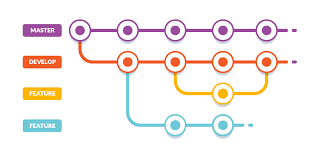
Estructura de Ramas: El Mapa Completo
main (producción)
  │
  ├─── staging (pre-producción)
  │     │
  │     ├─── qa/feature-1 (en pruebas QA)
  │     ├─── qa/feature-2 (en pruebas QA)
  │     └─── qa/feature-3 (en pruebas QA)
  │
  └─── hotfix/issue-123 (emergencias)
Las Ramas y Su Propósito
1. main - La Verdad en Producción
Regla de oro: main siempre refleja lo que está en producción.
# NUNCA trabajes directamente en main
# NUNCA hagas merge manual a main
# Solo GitHub Actions puede actualizar main
Protecciones requeridas en GitHub:
# Settings > Branches > Branch protection rules for main
- Require pull request reviews before merging (2 approvals)
- Require status checks to pass before merging
- Require branches to be up to date before merging
- Require conversation resolution before merging
- Do not allow bypassing the above settings
- Restrict who can push to matching branches (solo CI/CD)
2. staging - El Candidato a Producción
staging es donde se acumulan todas las features que QA ya aprobó y están listas para revisión final del Product Owner.
Flujo:
# staging recibe merges de ramas qa/* que ya fueron aprobadas
qa/user-profile-update (✓ Aprobado por QA)
    ↓ merge
staging (ahora incluye user-profile-update)
    ↓ despliegue automático
Azure Container Apps Staging
Característica clave: staging puede tener múltiples features esperando aprobación del PO.
# Ejemplo de staging con 3 features esperando
git log --oneline staging
a1b2c3d Merge qa/payment-gateway
e4f5g6h Merge qa/user-profile-update
i7j8k9l Merge qa/notification-system
3. qa/* - Features en Pruebas
Cada historia de usuario tiene su propia rama qa/nombre-descriptivo.
Convención de nombres:
qa/feature-payment-gateway       # Nueva funcionalidad
qa/fix-login-redirect           # Corrección de bug
qa/refactor-user-service        # Refactorización
qa/update-react-18 # Actualización técnicaReglas:
- Se crea desde
staging(no desdemain) - Vive hasta que QA aprueba
- Se despliega automáticamente a ambiente QA
- Se elimina después del merge a
staging
4. feature/* - Desarrollo Individual
Cada desarrollador trabaja en su rama feature/* localmente.
feature/user-profile-update      # Tu rama de desarrollo
feature/payment-gateway # Rama de otro devReglas:
- Nunca se despliega automáticamente
- Sirve solo para trabajo individual
- Se mergea a
qa/*cuando está lista para pruebas - Es opcional (puedes trabajar directo en qa/* si prefieres)
El Flujo Completo: De Código a Producción
Paso 1: Developer escribe código
┌─────────────────────────────────────┐
│ feature/user-profile-update        │
│ (desarrollo local)                  │
└─────────────────────────────────────┘
                ↓
         Commit y push
                ↓
Paso 2: Preparar para QA
┌─────────────────────────────────────┐
│ qa/user-profile-update             │
│ (rama sincronizada con GitHub)      │
└─────────────────────────────────────┘
                ↓
      GitHub Actions detecta push
                ↓
Paso 3: Despliegue automático a QA
┌─────────────────────────────────────┐
│ Portainer QA Environment            │
│ URL: user-profile-update.qa.com     │
└─────────────────────────────────────┘
                ↓
         QA prueba y aprueba
                ↓
Paso 4: Merge a Staging
┌─────────────────────────────────────┐
│ staging (rama acumuladora)          │
└─────────────────────────────────────┘
                ↓
      GitHub Actions detecta merge
                ↓
Paso 5: Despliegue automático a Staging
┌─────────────────────────────────────┐
│ Azure Container Apps Staging        │
│ URL: staging.tuempresa.com          │
└─────────────────────────────────────┘
                ↓
         PO revisa y aprueba
                ↓
Paso 6: Merge a Main (manual con aprobaciones)
┌─────────────────────────────────────┐
│ main (producción)                   │
└─────────────────────────────────────┘
                ↓
      GitHub Actions + Manual Approval
                ↓
Paso 7: Despliegue a Producción
┌─────────────────────────────────────┐
│ Azure Container Apps Production     │
│ URL: app.tuempresa.com              │
└─────────────────────────────────────┘
Comandos Git: El Día a Día del Desarrollador
Iniciar una Nueva Historia
# 1. Asegúrate de estar sincronizado con staging
git checkout staging
git pull origin staging

# 2. Crea tu rama qa/* directamente desde staging
git checkout -b qa/user-profile-update

# 3. (Opcional) Crea una rama feature/* para trabajo local
git checkout -b feature/user-profile-update

# 4. Desarrolla normalmente
# ... haces cambios en tu código ...

# 5. Commits semánticos (más sobre esto después)
git add .
git commit -m "feat(user): add profile picture upload"
git commit -m "feat(user): add image validation"
git commit -m "test(user): add upload integration tests"

# 6. Push a tu rama qa/* cuando esté lista para QA
git checkout qa/user-profile-update
git merge feature/user-profile-update  # Si usaste feature/*
git push origin qa/user-profile-update

# ✅ GitHub Actions despliega automáticamente a QA
Actualizar Tu Rama con Cambios de Staging
A veces staging recibe nuevas features mientras trabajas. Necesitas actualizarte:
# Estás en qa/user-profile-update con commits propios
git fetch origin

# Opción 1: Rebase (mantiene historial lineal - RECOMENDADO)
git rebase origin/staging

# Si hay conflictos:
# 1. Resuelve cada archivo en conflicto
# 2. git add <archivo-resuelto>
# 3. git rebase --continue

# Opción 2: Merge (crea merge commit)
git merge origin/staging

# Push con force si hiciste rebase
git push origin qa/user-profile-update --force-with-lease
QA Aprobó: Merge a Staging
# En GitHub, crea un Pull Request:
# From: qa/user-profile-update
# To: staging

# El PR debe incluir:
# - Descripción de la funcionalidad
# - Link al ticket de Jira/Azure DevOps
# - Screenshots o video demo
# - Checklist de testing realizado

# Después del merge automático en GitHub:
git checkout staging
git pull origin staging

# Limpia tu rama qa/* (ya no la necesitas)
git branch -d qa/user-profile-update
git push origin --delete qa/user-profile-update
Staging Aprobado: Merge a Main
# Este proceso es más controlado y requiere aprobaciones

# 1. En GitHub, crea un Pull Request:
# From: staging
# To: main

# 2. El PR debe ser aprobado por:
# - Product Owner (funcionalidad correcta)
# - Tech Lead (código revisado)
# - DevOps Lead (infraestructura lista)

# 3. El merge a main solo puede hacerse:
# - Durante horarios de despliegue (ej: martes y jueves 10am-2pm)
# - Con todo el equipo disponible
# - Con plan de rollback preparado

# 4. Después del merge, GitHub Actions despliega a producción
# con aprobación manual adicional
Sincronización Entre Múltiples Proyectos
Aquí está el desafío real: una historia que toca web, backend y mobile simultáneamente.
Estructura de Repositorios
tu-organizacion/
├── web-app/               (React + TypeScript)
├── api-service/           (Go)
├── mobile-app/            (Flutter)
└── infrastructure/        (Terraform + K8s configs)
Estrategia: Sincronización por Convención de Nombres
Usa el mismo nombre de rama en los 3 repositorios:
# En web-app/
git checkout -b qa/user-profile-update
# Cambios: componente ProfileUpload.tsx, página /profile

# En api-service/
git checkout -b qa/user-profile-update
# Cambios: endpoint POST /api/v1/users/profile/upload

# En mobile-app/
git checkout -b qa/user-profile-update
# Cambios: pantalla ProfileScreen, ImagePicker integration
Por qué funciona:
- GitHub Actions detecta el nombre de rama y despliega los 3 proyectos coordinadamente
- QA sabe que debe probar web + mobile juntos
- Si una parte falla QA, todas permanecen en ambiente QA
- El merge a staging se hace simultáneamente en los 3 repos
Script de Sincronización Multi-Repo
#!/bin/bash
# sync-multi-repo.sh

BRANCH_NAME=$1

if [ -z "$BRANCH_NAME" ]; then
  echo "Usage: ./sync-multi-repo.sh qa/feature-name"
  exit 1
fi

REPOS=("web-app" "api-service" "mobile-app")

echo "🔄 Sincronizando rama $BRANCH_NAME en todos los repositorios..."

for repo in "${REPOS[@]}"; do
  echo ""
  echo "📦 Procesando $repo..."
  cd ~/$repo

  # Fetch latest
  git fetch origin

  # Switch to branch (create if doesn't exist)
  git checkout $BRANCH_NAME 2>/dev/null || git checkout -b $BRANCH_NAME origin/staging

  # Pull latest changes
  git pull origin $BRANCH_NAME

  echo "✅ $repo actualizado"
done

echo ""
echo "✅ Todos los repositorios sincronizados en $BRANCH_NAME"
Uso:
# Sincronizar todos los repos a la misma rama
./sync-multi-repo.sh qa/user-profile-update

# Hacer commits en cada repo según los cambios
cd ~/web-app && git commit -am "feat(profile): add upload UI"
cd ~/api-service && git commit -am "feat(profile): add upload endpoint"
cd ~/mobile-app && git commit -am "feat(profile): add upload screen"

# Push todos a la vez
cd ~/web-app && git push origin qa/user-profile-update &
cd ~/api-service && git push origin qa/user-profile-update &
cd ~/mobile-app && git push origin qa/user-profile-update &
wait

echo "✅ Todos los cambios en QA"
Colaboración del Equipo: Roles y Responsabilidades
Entender cómo cada persona interactúa con este flujo es crítico para el éxito.
Desarrollador: El Creador del Cambio
Responsabilidades diarias:
-
Al iniciar el sprint:
- Revisar historias asignadas en Jira/Azure DevOps
- Estimar complejidad con el equipo
- Identificar dependencias entre proyectos (web/api/mobile)
- Comunicar al equipo qué ramas va a crear
-
Durante el desarrollo:
- Crear rama
qa/nombre-historiadesdestaging - Commits frecuentes y atómicos siguiendo convenciones
- Pruebas locales exhaustivas antes de push
- Actualizar diariamente desde
stagingpara evitar conflictos grandes
- Crear rama
-
Al terminar desarrollo:
- Push a
qa/nombre-historia - Esperar despliegue automático a QA (5-10 min)
- Notificar a QA en Slack/Teams con URL de testing
- Documentar en el ticket: qué cambió, cómo probar, qué esperar
- Push a
-
Durante revisión de QA:
- Estar disponible para preguntas
- Hacer fixes rápidos si QA encuentra bugs
- NO mezclar fixes con nuevas features
- Commits de corrección:
fix(qa): corregir validación de email
-
Después de aprobación QA:
- Crear PR de
qa/nombre-historia→staging - Pedir code review a otro desarrollador
- Mergear después de 1-2 aprobaciones
- Verificar despliegue en staging
- Eliminar rama
qa/local y remota
- Crear PR de
Ejemplo de día típico:
# 9:00 AM - Daily standup
# "Estoy trabajando en qa/user-profile-update, toca web y API"

# 9:30 AM - Sincronización
git checkout staging && git pull origin staging
git checkout qa/user-profile-update
git rebase origin/staging  # Mantenerme actualizado

# 10:00 AM - Desarrollo
cd ~/web-app
# ... código React ...
git add src/components/ProfileUpload.tsx
git commit -m "feat(profile): add image upload component"

cd ~/api-service
# ... código Go ...
git add internal/profile/upload.go
git commit -m "feat(profile): add upload handler with S3 integration"

# 12:00 PM - Testing local
docker-compose up
npm run test
go test ./...

# 2:00 PM - Push a QA
cd ~/web-app && git push origin qa/user-profile-update
cd ~/api-service && git push origin qa/user-profile-update

# 2:15 PM - Notificar a QA en Slack
# "🚀 qa/user-profile-update desplegado"
# "URL: https://user-profile-update.qa.tuempresa.com"
# "Para probar: Login > Profile > Click 'Upload' > Selecciona imagen"

# 3:00 PM - QA encuentra bug en validación de tamaño
cd ~/web-app
git add src/utils/imageValidator.ts
git commit -m "fix(qa): add max 5MB validation for uploads"
git push origin qa/user-profile-update

# 4:00 PM - QA aprueba ✅
# Crear PR en GitHub: qa/user-profile-update -> staging

# 4:30 PM - Code review aprobado, merge completado
git checkout staging
git pull origin staging
git branch -d qa/user-profile-update
git push origin --delete qa/user-profile-update
QA Engineer: El Guardián de Calidad
Responsabilidades diarias:
-
Recibir notificación de nueva feature en QA:
- Revisar descripción en ticket
- Entender criterios de aceptación
- Identificar casos edge a probar
-
Testing funcional:
- Probar happy path (flujo normal)
- Probar validaciones y mensajes de error
- Probar límites (inputs muy largos, archivos grandes, etc.)
- Probar en diferentes navegadores (si es web)
- Probar en iOS y Android (si es mobile)
-
Documentar resultados:
- Screenshots de bugs encontrados
- Pasos para reproducir problemas
- Actualizar estado en Jira: “En Testing”, “Failed QA”, “Passed QA”
- Comunicar al dev: aprobado o qué corregir
-
Aprobación:
- Marcar historia como “QA Approved” en Jira
- Aprobar PR en GitHub (si tiene permisos)
- Notificar en daily siguiente
Checklist de QA (ejemplo para user-profile-update):
## QA Checklist: User Profile Update (qa/user-profile-update)

### Setup

- [ ] Ambiente QA accesible: https://user-profile-update.qa.tuempresa.com
- [ ] Datos de prueba creados: usuario test@qa.com
- [ ] Logs monitoreados en Portainer

### Funcional

- [ ] Subir imagen PNG < 5MB → ✅ Success
- [ ] Subir imagen JPG < 5MB → ✅ Success
- [ ] Subir imagen > 5MB → ❌ Muestra error "Max 5MB"
- [ ] Subir archivo PDF → ❌ Muestra error "Solo imágenes"
- [ ] Subir sin seleccionar archivo → ❌ Botón deshabilitado
- [ ] Imagen se muestra después de upload → ✅ Preview correcto
- [ ] Imagen persiste después de refresh → ✅ Se mantiene

### Cross-browser (Web)

- [ ] Chrome → ✅ Funciona
- [ ] Firefox → ✅ Funciona
- [ ] Safari → ⚠️ Lento pero funciona
- [ ] Edge → ✅ Funciona

### Mobile (si aplica)

- [ ] Android (Flutter) → ✅ Funciona
- [ ] iOS (Flutter) → ✅ Funciona
- [ ] Permisos de cámara solicitados → ✅ Correcto
- [ ] Permisos de galería solicitados → ✅ Correcto

### Performance

- [ ] Upload < 2s para imagen 2MB → ✅ 1.2s promedio
- [ ] Sin memory leaks → ✅ Checked en DevTools

### Security

- [ ] Validación de tipo de archivo en backend → ✅ Verificado
- [ ] Sanitización de nombre de archivo → ✅ Verified in logs

### Resultado Final

✅ **APROBADO** - Ready for Staging

Notas: Safari tiene pequeño delay al mostrar preview (2s vs 0.5s otros browsers)
pero es aceptable. Feature lista para staging.
Scrum Master: El Facilitador del Flujo
Responsabilidades:
-
Eliminar blockers:
- Identificar cuellos de botella en el flujo (ej: QA sobrecargado)
- Coordinar prioridades cuando múltiples features compiten por QA
- Mediar conflictos de merge complejos entre devs
-
Monitorear métricas:
- Lead time: tiempo desde commit hasta producción
- Cycle time: tiempo desde QA hasta staging
- Failure rate: % de features que fallan QA primera vez
-
Facilitar ceremonias:
- Daily Standup: verificar que no hay branches bloqueadas
- Sprint Planning: identificar historias que tocan múltiples repos
- Retrospectiva: discutir problemas del flujo git y mejorar
Dashboard que el Scrum Master monitorea:
┌────────────────────────────────────────────────────────────────┐
│                   SPRINT 24 - Git Flow Metrics                 │
├────────────────────────────────────────────────────────────────┤
│                                                                │
│  📊 Branches en QA:                    4 activas              │
│     qa/user-profile-update            [En Testing]            │
│     qa/payment-gateway                [QA Aprobado]  ⚠️       │
│     qa/notification-system            [En Testing]            │
│     qa/dark-mode                      [Bloqueado - API]  🚨   │
│                                                                │
│  📊 Branches en Staging:               2 features             │
│     - user-profile-update                                      │
│     - payment-gateway                                          │
│                                                                │
│  📊 Esperando Despliegue a Prod:      1 release               │
│     staging -> main (aprobación PO pendiente)                 │
│                                                                │
│  ⚠️  Alertas:                                                  │
│     • qa/dark-mode bloqueada 2 días (esperando API cambio)   │
│     • qa/payment-gateway aprobada pero no merged (recordar)   │
│                                                                │
│  📈 Métricas Sprint:                                           │
│     Lead Time Promedio:               4.2 días                │
│     QA Approval Rate First Time:      60%                     │
│     Merge Conflicts This Sprint:      3                       │
│                                                                │
└────────────────────────────────────────────────────────────────┘
Acción en Daily:
Scrum Master: "Veo que qa/dark-mode está bloqueada 2 días esperando cambio en API.
              Carlos, ¿puedes priorizar eso hoy? María necesita continuar."

Scrum Master: "qa/payment-gateway fue aprobada por QA ayer pero no se ha mergeado
              a staging. Juan, ¿puedes hacer el PR después de este daily?"

Scrum Master: "Recordatorio: el viernes es día de release a producción. Todo lo que
              esté en staging el jueves a las 5pm será incluido. PO validará staging
              mañana por la tarde."
Product Owner: El Validador del Valor
Responsabilidades:
-
Definir criterios de aceptación claros:
- Escribir user stories con ejemplos concretos
- Definir qué es “done” antes de que dev empiece
- Estar disponible para aclarar dudas durante desarrollo
-
Validación en Staging:
- Revisar staging 1-2 veces por semana
- Probar features desde perspectiva de usuario final
- Aprobar o solicitar cambios ANTES de producción
-
Priorizar despliegues:
- Decidir qué features van juntas a producción
- Aprobar PR de staging → main
- Comunicar release notes a stakeholders
Ejemplo de validación en Staging:
## PO Review - Staging (11 Nov 2025)

### Features en Staging Esta Semana

1. ✅ User Profile Update

   - Probado en web y mobile
   - Funciona perfectamente
   - UI clara y responsive
   - **APROBADO** para producción

2. ⚠️ Payment Gateway Integration

   - Funciona en web
   - Mobile muestra error "Connection timeout" al pagar
   - **NO APROBADO** - regresar a desarrollo
   - Crear bug: "Mobile payment timeout en staging"

3. ✅ Notification System
   - Notificaciones llegan correctamente
   - Diseño consistente con brand guidelines
   - **APROBADO** para producción

### Decisión

Desplegar a producción el viernes:

- User Profile Update ✅
- Notification System ✅

Payment Gateway necesita fix, se desplega siguiente sprint.
Comunicación con equipo en Slack:
#product-updates

PO: "🎯 Staging Review Completado"

Aprobado para release viernes:
✅ User Profile Update - Excelente trabajo María y Carlos
✅ Notification System - Funcionando perfecto

❌ Payment Gateway - Juan, hay timeout en mobile
Ver issue #456 que creé con detalles

¿Podemos tener payment-gateway arreglado para siguiente release?
Target: 18 nov
Tech Lead: El Arquitecto del Código
Responsabilidades:
-
Code reviews de PRs importantes:
- Revisar PRs de qa/* → staging para calidad de código
- Revisar PRs de staging → main con ojo crítico
- Asegurar consistencia de arquitectura entre repos
-
Gestión de deuda técnica:
- Identificar refactorizaciones necesarias
- Programar sprints de limpieza técnica
- Mantener documentación actualizada
-
Mentorship:
- Ayudar a devs junior con merge conflicts complejos
- Enseñar mejores prácticas de git
- Revisar commits para asegurar buenas convenciones
Code Review Checklist:
## Code Review: qa/user-profile-update -> staging

### Arquitectura

- [ ] ✅ Componentes siguen patrón establecido (Container/Presenter)
- [ ] ✅ API endpoints siguen RESTful conventions
- [ ] ✅ Cambios en DB tienen migrations correctas
- [ ] ⚠️ Falta documentación de nuevo endpoint (agregar OpenAPI spec)

### Código

- [ ] ✅ No hay código duplicado
- [ ] ✅ Nombres de variables descriptivos
- [ ] ✅ Funciones pequeñas y enfocadas
- [ ] ✅ Manejo de errores adecuado

### Testing

- [ ] ✅ Tests unitarios agregados (coverage 85%)
- [ ] ✅ Tests de integración funcionando
- [ ] ⚠️ Falta test de edge case: ¿qué pasa si S3 está down?

### Seguridad

- [ ] ✅ Input validation en frontend y backend
- [ ] ✅ No hay credenciales hardcodeadas
- [ ] ✅ Archivos subidos son validados

### Performance

- [ ] ✅ Queries optimizadas (no N+1)
- [ ] ⚠️ Considera agregar caching para profile images

### Resultado

✅ **APROBADO CON COMENTARIOS**
Por favor agrega:

1. OpenAPI documentation para POST /api/v1/users/profile/upload
2. Test para fallback cuando S3 falla
3. (Opcional pero recomendado) Caching de profile images

Después de esos cambios, puedes mergear.
Caso Real Completo: Historia Multi-Proyecto
Veamos un ejemplo completo de una historia que toca web, backend y mobile simultáneamente, desde planning hasta producción.
User Story: Sistema de Notificaciones Push
Ticket: PROJ-456
Título: Como usuario, quiero recibir notificaciones push cuando alguien comenta en mi publicación
Complejidad: 13 puntos (Fibonacci)
Sprint: 24
Criterios de Aceptación:
- Usuario recibe notificación en mobile cuando hay nuevo comentario
- Notificación muestra avatar del comentador y preview del texto
- Al hacer tap en notificación, abre la app en el post correcto
- Usuario puede desactivar notificaciones en settings
- Web muestra badge de notificaciones no leídas
Proyectos Afectados:
web-app: Badge de notificaciones, página de settingsapi-service: Endpoints de notificaciones, integración con Firebasemobile-app: Manejo de push notifications, deep linking
Fase 1: Planning y Estimación (Lunes 9:00 AM)
Sprint Planning Meeting:
PO: "La historia PROJ-456 es prioritaria este sprint. Usuarios han pedido
     notificaciones push desde hace meses."

Tech Lead: "Esto toca los 3 proyectos. Necesitamos coordinación."

María (Frontend): "En web es agregar badge y settings. ~3 puntos mi parte."

Carlos (Backend): "Necesito integrar Firebase Cloud Messaging, crear endpoints,
                   gestionar tokens de dispositivos. ~5 puntos."

Juan (Mobile): "Recibir notificaciones, deep linking, permisos. ~5 puntos."

Tech Lead: "Total 13 puntos. ¿Podemos dividir en subtareas?"

Scrum Master: "Propongo este orden:
               1. Carlos: API endpoints y DB schema (día 1-2)
               2. Juan: Mobile recibe notificaciones (día 2-3)
               3. María: Web badge y settings (día 3-4)
               4. Todos: Integración y testing (día 4-5)"

Equipo: "✅ De acuerdo"
Subtareas Creadas:
- PROJ-456-1: [API] Crear tabla de notificaciones y tokens
- PROJ-456-2: [API] Endpoint POST /api/v1/notifications/send
- PROJ-456-3: [API] Endpoint GET /api/v1/notifications/user/:id
- PROJ-456-4: [Mobile] Setup Firebase Cloud Messaging
- PROJ-456-5: [Mobile] Manejar recepción de notificaciones
- PROJ-456-6: [Mobile] Implementar deep linking
- PROJ-456-7: [Web] Badge de notificaciones en header
- PROJ-456-8: [Web] Página de settings de notificaciones
Fase 2: Desarrollo (Lunes-Jueves)
Día 1 - Carlos (Backend)
# 9:00 AM - Crear rama desde staging
cd ~/api-service
git checkout staging
git pull origin staging
git checkout -b qa/notification-system

# 9:30 AM - Crear migration de DB
touch migrations/20251111_create_notifications.sql
-- migrations/20251111_create_notifications.sql
CREATE TABLE notifications (
id UUID PRIMARY KEY DEFAULT gen_random_uuid(),
user_id UUID NOT NULL REFERENCES users(id),
type VARCHAR(50) NOT NULL,
title VARCHAR(255) NOT NULL,
body TEXT NOT NULL,
data JSONB,
read_at TIMESTAMP,
created_at TIMESTAMP DEFAULT NOW()
);
CREATE TABLE device_tokens (
id UUID PRIMARY KEY DEFAULT gen_random_uuid(),
user_id UUID NOT NULL REFERENCES users(id),
token VARCHAR(255) NOT NULL UNIQUE,
platform VARCHAR(20) NOT NULL, -- 'ios' or 'android'
created_at TIMESTAMP DEFAULT NOW(),
last_used_at TIMESTAMP DEFAULT NOW()
);
CREATE INDEX idx_notifications_user_id ON notifications(user_id);
CREATE INDEX idx_notifications_created_at ON notifications(created_at DESC);
CREATE INDEX idx_device_tokens_user_id ON device_tokens(user_id);# Commit de migration
git add migrations/
git commit -m "feat(notifications): add database schema for notifications and device tokens
- Create notifications table with user_id, type, title, body
- Create device_tokens table for FCM tokens
- Add indexes for performance
- Support for iOS and Android platforms
Related: PROJ-456"
# 11:00 AM - Implementar service de notificaciones
touch internal/notifications/service.go// internal/notifications/service.go
package notifications
import (
"context"
firebase "firebase.google.com/go"
"firebase.google.com/go/messaging"
)
type Service struct {
db *sql.DB
fcmClient *messaging.Client
}
func NewService(db *sql.DB, firebaseApp *firebase.App) (*Service, error) {
ctx := context.Background()
fcmClient, err := firebaseApp.Messaging(ctx)
if err != nil {
return nil, err
}
return &Service{db: db, fcmClient: fcmClient}, nil
}
func (s *Service) SendNotification(ctx context.Context, userID string, notification Notification) error {
// 1. Guardar notificación en DB
if err := s.saveNotification(ctx, userID, notification); err != nil {
return err
}
// 2. Obtener tokens del usuario
tokens, err := s.getUserDeviceTokens(ctx, userID)
if err != nil {
return err
}
// 3. Enviar via Firebase
message := &messaging.MulticastMessage{
Notification: &messaging.Notification{
Title: notification.Title,
Body: notification.Body,
},
Data: notification.Data,
Tokens: tokens,
}
_, err = s.fcmClient.SendMulticast(ctx, message)
return err
}# 2:00 PM - Crear endpoints
touch internal/api/handlers/notifications.go// internal/api/handlers/notifications.go
package handlers
func (h *Handler) RegisterDeviceToken(w http.ResponseWriter, r *http.Request) {
var req struct {
Token string `json:"token"`
Platform string `json:"platform"`
}
if err := json.NewDecoder(r.Body).Decode(&req); err != nil {
http.Error(w, "Invalid request", http.StatusBadRequest)
return
}
userID := r.Context().Value("user_id").(string)
err := h.notificationService.RegisterDeviceToken(r.Context(), userID, req.Token, req.Platform)
if err != nil {
http.Error(w, "Failed to register token", http.StatusInternalServerError)
return
}
w.WriteHeader(http.StatusCreated)
json.NewEncoder(w).Encode(map[string]string{"status": "registered"})
}
func (h *Handler) GetUserNotifications(w http.ResponseWriter, r *http.Request) {
userID := chi.URLParam(r, "userID")
notifications, err := h.notificationService.GetUserNotifications(r.Context(), userID)
if err != nil {
http.Error(w, "Failed to fetch notifications", http.StatusInternalServerError)
return
}
json.NewEncoder(w).Encode(notifications)
}# 4:00 PM - Tests y commit
go test ./internal/notifications/...
git add .
git commit -m "feat(notifications): implement notification service and endpoints
- Add NotificationService with Firebase integration
- POST /api/v1/notifications/tokens - register device token
- GET /api/v1/notifications/user/:id - get user notifications
- Multicast support for multiple devices
- Include tests with 89% coverage
Related: PROJ-456-1, PROJ-456-2, PROJ-456-3"
# Push a QA
git push origin qa/notification-systemDía 2 - Juan (Mobile)
# 9:00 AM - Esperar que backend esté en QA
# Verificar en Slack que Carlos ya pusheó

cd ~/mobile-app
git checkout staging
git pull origin staging
git checkout -b qa/notification-system

# 9:30 AM - Agregar dependencias de Firebase
# Editar pubspec.yaml
# pubspec.yaml
dependencies:
flutter:
sdk: flutter
firebase_core: ^2.24.0
firebase_messaging: ^14.7.6
flutter_local_notifications: ^16.3.0# 10:00 AM - Configurar Firebase
flutter pub get
# Agregar google-services.json (Android)
# Agregar GoogleService-Info.plist (iOS)
# 11:00 AM - Implementar servicio de notificaciones
touch lib/services/notification_service.dart// lib/services/notification_service.dart
import 'package:firebase_messaging/firebase_messaging.dart';
import 'package:flutter_local_notifications/flutter_local_notifications.dart';
class NotificationService {
final FirebaseMessaging _firebaseMessaging = FirebaseMessaging.instance;
final FlutterLocalNotificationsPlugin _localNotifications = FlutterLocalNotificationsPlugin();
Future<void> initialize() async {
// Solicitar permisos
await _firebaseMessaging.requestPermission(
alert: true,
badge: true,
sound: true,
);
// Obtener token
String? token = await _firebaseMessaging.getToken();
if (token != null) {
await _registerTokenWithBackend(token);
}
// Escuchar cambios de token
_firebaseMessaging.onTokenRefresh.listen(_registerTokenWithBackend);
// Configurar notificaciones locales
const androidSettings = AndroidInitializationSettings('@mipmap/ic_launcher');
const iosSettings = DarwinInitializationSettings();
await _localNotifications.initialize(
const InitializationSettings(android: androidSettings, iOS: iosSettings),
onDidReceiveNotificationResponse: _handleNotificationTap,
);
// Manejar notificaciones en foreground
FirebaseMessaging.onMessage.listen(_handleForegroundNotification);
// Manejar tap en notificación (app en background)
FirebaseMessaging.onMessageOpenedApp.listen(_handleNotificationTap);
}
Future<void> _registerTokenWithBackend(String token) async {
final response = await http.post(
Uri.parse('${Config.apiUrl}/api/v1/notifications/tokens'),
headers: {'Content-Type': 'application/json'},
body: json.encode({
'token': token,
'platform': Platform.isIOS ? 'ios' : 'android',
}),
);
if (response.statusCode != 201) {
print('Failed to register token: ${response.body}');
}
}
Future<void> _handleForegroundNotification(RemoteMessage message) async {
// Mostrar notificación local cuando app está en foreground
await _localNotifications.show(
message.hashCode,
message.notification?.title,
message.notification?.body,
const NotificationDetails(
android: AndroidNotificationDetails(
'default_channel',
'Default Channel',
importance: Importance.high,
),
iOS: DarwinNotificationDetails(),
),
payload: json.encode(message.data),
);
}
void _handleNotificationTap(NotificationResponse response) {
// Deep linking: abrir el post correcto
if (response.payload != null) {
final data = json.decode(response.payload!);
final postId = data['post_id'];
navigatorKey.currentState?.pushNamed('/post/$postId');
}
}
}# 3:00 PM - Testing en emuladores
flutter run -d android
flutter run -d ios
# 4:30 PM - Commits y push
git add .
git commit -m "feat(notifications): implement Firebase Cloud Messaging
- Add firebase_messaging and local notifications
- Request permissions on iOS and Android
- Register device tokens with backend
- Handle foreground notifications with local notifications
- Implement deep linking to posts
- Support for notification tap when app is background
Related: PROJ-456-4, PROJ-456-5, PROJ-456-6"
git push origin qa/notification-systemDía 3 - María (Frontend Web)
# 9:00 AM - Crear rama
cd ~/web-app
git checkout staging
git pull origin staging
git checkout -b qa/notification-system

# 9:30 AM - Crear componente de badge
touch src/components/NotificationBadge.tsx
// src/components/NotificationBadge.tsx
import React, { useEffect, useState } from "react";
import { Bell } from "lucide-react";
import { api } from "../services/api";
interface Notification {
id: string;
title: string;
body: string;
read_at: string | null;
created_at: string;
}
export const NotificationBadge: React.FC = () => {
const [notifications, setNotifications] = useState<Notification[]>([]);
const [isOpen, setIsOpen] = useState(false);
const unreadCount = notifications.filter((n) => !n.read_at).length;
useEffect(() => {
fetchNotifications();
// Poll cada 30 segundos
const interval = setInterval(fetchNotifications, 30000);
return () => clearInterval(interval);
}, []);
const fetchNotifications = async () => {
try {
const response = await api.get<Notification[]>(
"/api/v1/notifications/user/me"
);
setNotifications(response.data);
} catch (error) {
console.error("Failed to fetch notifications", error);
}
};
const markAsRead = async (id: string) => {
try {
await api.patch(`/api/v1/notifications/${id}/read`);
setNotifications((prev) =>
prev.map((n) =>
n.id === id ? { ...n, read_at: new Date().toISOString() } : n
)
);
} catch (error) {
console.error("Failed to mark as read", error);
}
};
return (
<div className="relative">
<button
onClick={() => setIsOpen(!isOpen)}
className="relative p-2 hover:bg-gray-100 rounded-full"
>
<Bell className="w-6 h-6" />
{unreadCount > 0 && (
<span className="absolute top-0 right-0 bg-red-500 text-white text-xs rounded-full w-5 h-5 flex items-center justify-center">
{unreadCount}
</span>
)}
</button>
{isOpen && (
<div className="absolute right-0 mt-2 w-80 bg-white rounded-lg shadow-lg border z-50">
<div className="p-4 border-b">
<h3 className="font-semibold">Notificaciones</h3>
</div>
<div className="max-h-96 overflow-y-auto">
{notifications.length === 0 ? (
<div className="p-4 text-center text-gray-500">
No tienes notificaciones
</div>
) : (
notifications.map((notification) => (
<div
key={notification.id}
onClick={() => markAsRead(notification.id)}
className={`p-4 border-b hover:bg-gray-50 cursor-pointer ${
!notification.read_at ? "bg-blue-50" : ""
}`}
>
<h4 className="font-medium">{notification.title}</h4>
<p className="text-sm text-gray-600">{notification.body}</p>
<span className="text-xs text-gray-400">
{formatDistanceToNow(new Date(notification.created_at), {
addSuffix: true,
})}
</span>
</div>
))
)}
</div>
</div>
)}
</div>
);
};# 12:00 PM - Integrar en header
# Editar src/components/Header.tsx para agregar <NotificationBadge />
# 2:00 PM - Crear página de settings
touch src/pages/Settings/NotificationSettings.tsx// src/pages/Settings/NotificationSettings.tsx
import React, { useState, useEffect } from "react";
import { Toggle } from "../components/Toggle";
import { api } from "../services/api";
export const NotificationSettings: React.FC = () => {
const [settings, setSettings] = useState({
emailNotifications: true,
pushNotifications: true,
commentNotifications: true,
likeNotifications: false,
});
useEffect(() => {
loadSettings();
}, []);
const loadSettings = async () => {
const response = await api.get("/api/v1/users/me/settings/notifications");
setSettings(response.data);
};
const updateSetting = async (key: string, value: boolean) => {
setSettings((prev) => ({ ...prev, [key]: value }));
await api.patch("/api/v1/users/me/settings/notifications", {
[key]: value,
});
};
return (
<div className="max-w-2xl mx-auto p-6">
<h1 className="text-2xl font-bold mb-6">
Configuración de Notificaciones
</h1>
<div className="bg-white rounded-lg shadow p-6 space-y-4">
<div className="flex items-center justify-between">
<div>
<h3 className="font-medium">Notificaciones por Email</h3>
<p className="text-sm text-gray-600">
Recibe resumen diario por email
</p>
</div>
<Toggle
checked={settings.emailNotifications}
onChange={(val) => updateSetting("emailNotifications", val)}
/>
</div>
<div className="flex items-center justify-between">
<div>
<h3 className="font-medium">Notificaciones Push</h3>
<p className="text-sm text-gray-600">
Recibe notificaciones en tiempo real
</p>
</div>
<Toggle
checked={settings.pushNotifications}
onChange={(val) => updateSetting("pushNotifications", val)}
/>
</div>
<div className="flex items-center justify-between">
<div>
<h3 className="font-medium">Nuevos Comentarios</h3>
<p className="text-sm text-gray-600">
Cuando alguien comenta en tus publicaciones
</p>
</div>
<Toggle
checked={settings.commentNotifications}
onChange={(val) => updateSetting("commentNotifications", val)}
/>
</div>
<div className="flex items-center justify-between">
<div>
<h3 className="font-medium">Nuevos Likes</h3>
<p className="text-sm text-gray-600">
Cuando alguien da like a tus publicaciones
</p>
</div>
<Toggle
checked={settings.likeNotifications}
onChange={(val) => updateSetting("likeNotifications", val)}
/>
</div>
</div>
</div>
);
};# 4:00 PM - Tests y commit
npm run test
npm run lint
git add .
git commit -m "feat(notifications): add notification badge and settings page
- Add NotificationBadge component with unread count
- Real-time polling every 30s
- Mark as read functionality
- Dropdown with recent notifications
- Settings page for notification preferences
- Toggle for email, push, comments, and likes
Related: PROJ-456-7, PROJ-456-8"
git push origin qa/notification-systemFase 3: Testing en QA (Viernes)
# 9:00 AM - Todos los proyectos desplegados en QA
# URLs activas:
# - https://notification-system.qa.tuempresa.com (web)
# - https://api-notification-system.qa.tuempresa.com (API)
# - App mobile instalada vía TestFlight/Firebase App Distribution
QA Engineer (Ana) comienza pruebas:
## QA Testing: PROJ-456 Notification System

### Setup ✅

- Web QA: https://notification-system.qa.tuempresa.com
- API QA: https://api-notification-system.qa.tuempresa.com
- Mobile: Instalado en iPhone 12 (iOS 17) y Pixel 6 (Android 13)
- Test users: qa1@test.com, qa2@test.com

### Test 1: Backend - Registro de tokens

- [ ] ✅ POST /api/v1/notifications/tokens con token válido → 201 Created
- [ ] ✅ Token guardado en DB (verificado en pgAdmin)
- [ ] ✅ Mismo token de mismo usuario no duplica (actualiza last_used_at)
- [ ] ❌ Token inválido → debería retornar 400 pero retorna 500

**BUG ENCONTRADO**: PROJ-456-BUG-1
Endpoint /tokens no valida formato de token antes de guardar.

### Test 2: Mobile - Recepción de notificaciones

- [ ] ✅ App solicita permisos correctamente (iOS y Android)
- [ ] ✅ Token se registra automáticamente al abrir app
- [ ] ✅ Notificación llega cuando qa2 comenta en post de qa1
- [ ] ✅ Notificación muestra título y cuerpo correctos
- [ ] ✅ Tap en notificación abre el post correcto
- [ ] ⚠️ En iOS, si app está cerrada completamente, notificación llega
      pero tap no abre el post (deep link no funciona)

**BUG ENCONTRADO**: PROJ-456-BUG-2
Deep linking no funciona cuando app está terminada en iOS.

### Test 3: Web - Badge de notificaciones

- [ ] ✅ Badge muestra cantidad correcta de no leídas
- [ ] ✅ Click abre dropdown con notificaciones
- [ ] ✅ Notificaciones ordenadas por fecha (más recientes primero)
- [ ] ✅ Click en notificación marca como leída
- [ ] ✅ Badge se actualiza después de marcar como leída
- [ ] ✅ Polling funciona (notificaciones nuevas aparecen automáticamente)

### Test 4: Web - Settings page

- [ ] ✅ Página carga settings actuales del usuario
- [ ] ✅ Toggles funcionan y guardan en backend
- [ ] ✅ Cambios persisten después de refresh
- [ ] ✅ UI responsive en mobile

### Test 5: Integración completa

Escenario: qa1 hace comentario en post de qa2

- [ ] ✅ qa2 recibe push notification en mobile (Android)
- [ ] ✅ qa2 recibe push notification en mobile (iOS)
- [ ] ✅ qa2 ve badge actualizado en web
- [ ] ✅ Tap en mobile abre post correcto (Android)
- [ ] ❌ Tap en mobile no abre post si app estaba cerrada (iOS) - Ya reportado

### Resultado

⚠️ **FAILED QA - 2 bugs encontrados**

Bugs:

1. PROJ-456-BUG-1: Validación de token en backend (Prioridad: Media)
2. PROJ-456-BUG-2: Deep link iOS cuando app cerrada (Prioridad: Alta)

Tiempo estimado de fix: 4 horas
Slack - Canal #qa-testing:
Ana (QA): "⚠️ PROJ-456 notification-system tiene 2 bugs.
           Bug crítico en iOS deep linking. @Juan ¿puedes revisar?"

Juan: "Sí, revisando ahora. Es tema de configuración en Info.plist.
       Fix listo en 2 horas."

Carlos: "Bug de validación de token es rápido, ya lo estoy arreglando."
Fase 4: Corrección de Bugs (Viernes tarde)
# Juan - Fix iOS deep linking
cd ~/mobile-app
git checkout qa/notification-system

# Editar ios/Runner/Info.plist para agregar URL scheme
# Editar AppDelegate.swift para manejar cold start

git add ios/
git commit -m "fix(notifications): handle deep linking on iOS cold start

- Add proper URL scheme configuration
- Handle notification tap when app is terminated
- Test on iOS 17 with terminated app state

Fixes: PROJ-456-BUG-2"

git push origin qa/notification-system

# Carlos - Fix token validation
cd ~/api-service
git checkout qa/notification-system

# Agregar validación en handler
git add internal/api/handlers/notifications.go
git commit -m "fix(notifications): validate FCM token format before saving

- Add regex validation for FCM token format
- Return 400 Bad Request for invalid tokens
- Add tests for validation logic

Fixes: PROJ-456-BUG-1"

git push origin qa/notification-system

# Ambos cambios redesplegan automáticamente a QA
QA Re-testing (1 hora después):
### Re-Test: Bugs corregidos

✅ PROJ-456-BUG-1: Token inválido ahora retorna 400 con mensaje claro
✅ PROJ-456-BUG-2: Deep link funciona perfecto en iOS incluso con app cerrada

### Resultado Final

✅ **PASSED QA** - Feature lista para staging
Fase 5: Merge a Staging (Lunes siguiente)
# Cada repo crea PR: qa/notification-system -> staging

# PR en web-app (María crea):
# - Title: "[PROJ-456] Notification Badge and Settings"
# - Description: "Adds notification badge in header with unread count and settings page"
# - Reviewers: Tech Lead
# - Link al ticket: PROJ-456

# PR en api-service (Carlos crea):
# - Title: "[PROJ-456] Notification Service with Firebase"
# - Description: "Implements FCM integration and notification endpoints"
# - Reviewers: Tech Lead
# - Link al ticket: PROJ-456

# PR en mobile-app (Juan crea):
# - Title: "[PROJ-456] Push Notifications and Deep Linking"
# - Description: "Firebase messaging integration with deep linking support"
# - Reviewers: Tech Lead
# - Link al ticket: PROJ-456
Tech Lead hace code review (se mostró antes).
Después de aprobaciones:
# Merges coordinados (misma hora para sincronizar)
# GitHub Actions despliega automáticamente a staging

# 30 minutos después, staging está actualizado:
# https://staging.tuempresa.com
Fase 6: Validación PO en Staging (Martes)
PO prueba en staging:
## PO Validation: Notification System (Staging)

### Funcionalidad ✅

- Recibo notificaciones en mi iPhone personal
- Badge en web funciona perfecto
- Settings claros y funcionales
- Deep linking funciona impecable

### UX ✅

- Notificaciones no son intrusivas
- Texto claro y accionable
- Settings intuitivos

### Business Value ✅

- Usuarios podrán mantenerse engaged
- Reduce necesidad de revisar app constantemente
- Diferenciador vs competencia

**APROBADO** para producción release del viernes 15 Nov
Fase 7: Deploy a Producción (Viernes 15 Nov)
# PO crea PR: staging -> main en los 3 repos
# Título: "Release v2.3.0 - Notification System"

# Aprobaciones requeridas:
# ✅ Product Owner
# ✅ Tech Lead
# ✅ DevOps Lead

# 10:00 AM - Merge aprobado y ejecutado
# GitHub Actions requiere aprobación manual para producción

# 10:15 AM - Team Lead aprueba deploy
# Blue-green deployment comienza

# 10:30 AM - Health checks passed
# Traffic switched to new version

# 10:45 AM - Monitoring: todo normal
# 📊 Latencia: 120ms avg (antes 118ms - aceptable)
# 📊 Error rate: 0.02% (normal)
# 📊 Memory: +15MB por pod (esperado con FCM)

# 11:00 AM - Anuncio en Slack
Slack - #announcements:
PO: "🎉 ¡Nueva feature en producción!"

🔔 Sistema de Notificaciones Push

Ahora los usuarios recibirán notificaciones cuando:
- Alguien comenta en sus publicaciones
- Y pueden configurar preferencias en Settings

Gracias @María @Carlos @Juan @Ana por el excelente trabajo.

PROJ-456 ✅ Completado
Automatización: GitHub Actions y Convenciones
La automatización es lo que hace que este flujo funcione sin intervención manual constante. Aquí está todo lo que necesitas automatizar.
Convenciones de Commits: Semantic Commits
Usa Conventional Commits para que los commits sean legibles y automáticamente generables los changelogs.
Formato:
<type>(<scope>): <description>

[optional body]

[optional footer]
Types permitidos:
feat: Nueva funcionalidadfix: Corrección de bugdocs: Cambios en documentaciónstyle: Cambios de formato (no afectan lógica)refactor: Refactorización de códigoperf: Mejoras de performancetest: Agregar o corregir testschore: Cambios en build, CI, dependencias
Scopes comunes:
api: Backendweb: Frontend webmobile: App mobiledb: Databaseauth: Autenticaciónnotifications: Notificaciones- etc.
Ejemplos buenos:
git commit -m "feat(auth): add Google OAuth integration"
git commit -m "fix(mobile): resolve crash on iOS 17 when uploading images"
git commit -m "refactor(api): extract user service to separate package"
git commit -m "test(notifications): add integration tests for FCM"
git commit -m "docs(readme): update deployment instructions for staging"
git commit -m "perf(db): add index on users.email for faster lookups"
Ejemplos malos (evitar):
git commit -m "update"
git commit -m "fix bug"
git commit -m "WIP"
git commit -m "asdfasdf"
git commit -m "changes"
Validación automática con git hooks:
# .git/hooks/commit-msg
#!/bin/bash

commit_msg_file=$1
commit_msg=$(cat "$commit_msg_file")

# Regex para conventional commits
pattern="^(feat|fix|docs|style|refactor|perf|test|chore)(\(.+\))?: .{10,}$"

if ! [[ $commit_msg =~ $pattern ]]; then
  echo "❌ Commit message inválido!"
  echo ""
  echo "Formato requerido:"
  echo "  <type>(<scope>): <description>"
  echo ""
  echo "Ejemplo:"
  echo "  feat(auth): add Google OAuth integration"
  echo ""
  echo "Types válidos: feat, fix, docs, style, refactor, perf, test, chore"
  exit 1
fi

echo "✅ Commit message válido"
Instalar hook en todo el equipo:
# setup-git-hooks.sh
#!/bin/bash

echo "📦 Instalando git hooks..."

# Copiar hooks a .git/hooks
cp scripts/hooks/commit-msg .git/hooks/commit-msg
chmod +x .git/hooks/commit-msg

echo "✅ Git hooks instalados"
echo "Ahora tus commits serán validados automáticamente"
GitHub Actions: Workflows Completos
Workflow 1: Deploy a QA (automático en push)
# .github/workflows/deploy-qa.yml
name: Deploy to QA

on:
  push:
    branches:
      - "qa/**"

env:
  REGISTRY: ghcr.io
  IMAGE_NAME: ${{ github.repository }}

jobs:
  # Job 1: Extract información de la rama
  prepare:
    runs-on: ubuntu-latest
    outputs:
      feature_name: ${{ steps.extract.outputs.feature_name }}
      branch_safe_name: ${{ steps.extract.outputs.branch_safe_name }}
    steps:
      - name: Extract feature name
        id: extract
        run: |
          # qa/notification-system -> notification-system
          FEATURE_NAME=${GITHUB_REF#refs/heads/qa/}
          # Reemplazar caracteres especiales para usar en URLs/DNS
          BRANCH_SAFE=$(echo "$FEATURE_NAME" | sed 's/[^a-z0-9-]/-/g')

          echo "feature_name=$FEATURE_NAME" >> $GITHUB_OUTPUT
          echo "branch_safe_name=$BRANCH_SAFE" >> $GITHUB_OUTPUT

          echo "🏷️ Feature: $FEATURE_NAME"
          echo "🔗 Safe name: $BRANCH_SAFE"

  # Job 2: Build y test
  build:
    needs: prepare
    runs-on: ubuntu-latest
    steps:
      - uses: actions/checkout@v4

      - name: Set up Go
        uses: actions/setup-go@v4
        with:
          go-version: "1.21"

      - name: Cache Go modules
        uses: actions/cache@v3
        with:
          path: ~/go/pkg/mod
          key: ${{ runner.os }}-go-${{ hashFiles('**/go.sum') }}

      - name: Run tests
        run: |
          go test -v -race -coverprofile=coverage.txt -covermode=atomic ./...

      - name: Upload coverage
        uses: codecov/codecov-action@v3
        with:
          file: ./coverage.txt

      - name: Build
        run: |
          CGO_ENABLED=0 GOOS=linux go build -o ./bin/api ./cmd/api

      - name: Login to GitHub Container Registry
        uses: docker/login-action@v3
        with:
          registry: ${{ env.REGISTRY }}
          username: ${{ github.actor }}
          password: ${{ secrets.GITHUB_TOKEN }}

      - name: Build and push Docker image
        uses: docker/build-push-action@v5
        with:
          context: .
          push: true
          tags: |
            ${{ env.REGISTRY }}/${{ env.IMAGE_NAME }}:qa-${{ needs.prepare.outputs.branch_safe_name }}
            ${{ env.REGISTRY }}/${{ env.IMAGE_NAME }}:qa-${{ needs.prepare.outputs.branch_safe_name }}-${{ github.sha }}
          cache-from: type=registry,ref=${{ env.REGISTRY }}/${{ env.IMAGE_NAME }}:buildcache
          cache-to: type=registry,ref=${{ env.REGISTRY }}/${{ env.IMAGE_NAME }}:buildcache,mode=max

  # Job 3: Deploy a Portainer QA
  deploy:
    needs: [prepare, build]
    runs-on: ubuntu-latest
    steps:
      - uses: actions/checkout@v4

      - name: Deploy to Portainer
        env:
          PORTAINER_URL: ${{ secrets.PORTAINER_URL }}
          PORTAINER_API_KEY: ${{ secrets.PORTAINER_API_KEY }}
          FEATURE_NAME: ${{ needs.prepare.outputs.branch_safe_name }}
        run: |
          # Crear stack en Portainer
          curl -X POST "$PORTAINER_URL/api/stacks" \
            -H "X-API-Key: $PORTAINER_API_KEY" \
            -H "Content-Type: application/json" \
            -d @- <<EOF
          {
            "name": "qa-$FEATURE_NAME",
            "stackFileContent": "$(cat docker-compose.qa.yml | jq -Rs .)",
            "env": [
              {
                "name": "IMAGE_TAG",
                "value": "qa-$FEATURE_NAME"
              },
              {
                "name": "FEATURE_NAME",
                "value": "$FEATURE_NAME"
              },
              {
                "name": "DATABASE_URL",
                "value": "${{ secrets.QA_DATABASE_URL }}"
              }
            ]
          }
          EOF

      - name: Wait for deployment
        run: |
          echo "⏳ Esperando que el servicio esté healthy..."
          sleep 30

          # Health check
          FEATURE_NAME="${{ needs.prepare.outputs.branch_safe_name }}"
          for i in {1..10}; do
            if curl -f "https://$FEATURE_NAME.qa.tuempresa.com/health"; then
              echo "✅ Servicio healthy"
              exit 0
            fi
            echo "Intento $i/10 falló, esperando 10s..."
            sleep 10
          done

          echo "❌ Servicio no responde después de 10 intentos"
          exit 1

      - name: Comment on PR
        uses: actions/github-script@v6
        if: github.event_name == 'pull_request'
        with:
          script: |
            const featureName = '${{ needs.prepare.outputs.branch_safe_name }}';
            github.rest.issues.createComment({
              issue_number: context.issue.number,
              owner: context.repo.owner,
              repo: context.repo.repo,
              body: `🚀 **Desplegado a QA**\n\n` +
                    `🔗 Web: https://${featureName}.qa.tuempresa.com\n` +
                    `📊 API: https://api-${featureName}.qa.tuempresa.com\n` +
                    `📝 Logs: ${process.env.PORTAINER_URL}/stacks/qa-${featureName}\n\n` +
                    `Ready for QA testing! 🧪`
            })

      - name: Notify Slack
        uses: slackapi/slack-github-action@v1
        with:
          payload: |
            {
              "text": "🚀 Nueva feature desplegada a QA",
              "blocks": [
                {
                  "type": "section",
                  "text": {
                    "type": "mrkdwn",
                    "text": "*QA Deployment*\n\nFeature: `${{ needs.prepare.outputs.feature_name }}`\nAuthor: ${{ github.actor }}\n\n🔗 <https://${{ needs.prepare.outputs.branch_safe_name }}.qa.tuempresa.com|Open QA Environment>"
                  }
                }
              ]
            }
        env:
          SLACK_WEBHOOK_URL: ${{ secrets.SLACK_WEBHOOK_QA }}
Workflow 2: Deploy a Staging (automático en merge)
# .github/workflows/deploy-staging.yml
name: Deploy to Staging

on:
  push:
    branches:
      - staging

env:
  REGISTRY: turegistry.azurecr.io

jobs:
  deploy:
    runs-on: ubuntu-latest
    environment:
      name: staging
      url: https://staging.tuempresa.com

    steps:
      - uses: actions/checkout@v4

      - name: Azure Login
        uses: azure/login@v1
        with:
          creds: ${{ secrets.AZURE_CREDENTIALS }}

      - name: Build and push to ACR
        run: |
          az acr build \
            --registry ${{ env.REGISTRY }} \
            --image api:staging-${{ github.sha }} \
            --image api:staging-latest \
            --file Dockerfile \
            .

      - name: Deploy to Azure Container Apps
        run: |
          az containerapp update \
            --name api-staging \
            --resource-group staging-rg \
            --image ${{ env.REGISTRY }}/api:staging-${{ github.sha }} \
            --set-env-vars \
              DATABASE_URL=secretref:db-url \
              REDIS_URL=secretref:redis-url \
              ENV=staging

      - name: Run database migrations
        run: |
          # Ejecutar migrations en pod temporal
          az containerapp exec \
            --name api-staging \
            --resource-group staging-rg \
            --command "/app/migrate up"

      - name: Smoke tests
        run: |
          # Health check
          curl -f https://api-staging.tuempresa.com/health || exit 1

          # Version check
          VERSION=$(curl -s https://api-staging.tuempresa.com/version | jq -r '.commit')
          if [ "$VERSION" != "${{ github.sha }}" ]; then
            echo "❌ Version mismatch: expected ${{ github.sha }}, got $VERSION"
            exit 1
          fi

          echo "✅ Smoke tests passed"

      - name: Notify team
        uses: slackapi/slack-github-action@v1
        with:
          payload: |
            {
              "text": "🎯 Staging Updated",
              "blocks": [
                {
                  "type": "section",
                  "text": {
                    "type": "mrkdwn",
                    "text": "*Staging Deployment Success*\n\nCommit: `${{ github.sha }}`\nAuthor: ${{ github.actor }}\n\n<https://staging.tuempresa.com|Open Staging>\n\nReady for PO review 👀"
                  }
                }
              ]
            }
        env:
          SLACK_WEBHOOK_URL: ${{ secrets.SLACK_WEBHOOK_STAGING }}
Workflow 3: Deploy a Producción (manual con aprobaciones)
# .github/workflows/deploy-production.yml
name: Deploy to Production

on:
  push:
    branches:
      - main
  workflow_dispatch:
    inputs:
      reason:
        description: "Reason for deployment"
        required: true

env:
  REGISTRY: turegistry.azurecr.io

jobs:
  # Pre-flight checks
  preflight:
    runs-on: ubuntu-latest
    steps:
      - uses: actions/checkout@v4

      - name: Check if staging is healthy
        run: |
          if ! curl -f https://staging.tuempresa.com/health; then
            echo "❌ Staging no está healthy. No se puede desplegar a producción."
            exit 1
          fi

      - name: Verify all tests passed in staging
        run: |
          # Verificar que el último commit en staging tiene tests passing
          # Esto se puede hacer consultando la API de GitHub
          echo "✅ Tests verified"

  # Requiere aprobación manual
  approve:
    needs: preflight
    runs-on: ubuntu-latest
    environment:
      name: production-approval
    steps:
      - name: Wait for approval
        run: echo "Esperando aprobaciones..."

  # Deployment con blue-green strategy
  deploy:
    needs: approve
    runs-on: ubuntu-latest
    environment:
      name: production
      url: https://app.tuempresa.com

    steps:
      - uses: actions/checkout@v4

      - name: Azure Login
        uses: azure/login@v1
        with:
          creds: ${{ secrets.AZURE_CREDENTIALS }}

      - name: Build and push to ACR
        run: |
          az acr build \
            --registry ${{ env.REGISTRY }} \
            --image api:${{ github.sha }} \
            --image api:latest \
            --file Dockerfile \
            .

      - name: Create new revision (Green)
        run: |
          # Crear nueva revision sin asignarle tráfico todavía
          az containerapp revision copy \
            --name api-prod \
            --resource-group production-rg \
            --image ${{ env.REGISTRY }}/api:${{ github.sha }} \
            --revision-suffix green-${{ github.run_number }}

      - name: Health check on green revision
        run: |
          # Verificar que la nueva revisión está healthy
          REVISION_NAME="api-prod--green-${{ github.run_number }}"

          for i in {1..20}; do
            STATUS=$(az containerapp revision show \
              --name api-prod \
              --resource-group production-rg \
              --revision $REVISION_NAME \
              --query "properties.healthState" -o tsv)

            if [ "$STATUS" == "Healthy" ]; then
              echo "✅ Green revision is healthy"
              break
            fi

            echo "Status: $STATUS, waiting... ($i/20)"
            sleep 15
          done

          if [ "$STATUS" != "Healthy" ]; then
            echo "❌ Green revision failed health check"
            exit 1
          fi

      - name: Run database migrations
        run: |
          az containerapp exec \
            --name api-prod \
            --resource-group production-rg \
            --revision api-prod--green-${{ github.run_number }} \
            --command "/app/migrate up"

      - name: Switch traffic to green (canary 10%)
        run: |
          # Primero enviar 10% de tráfico a nueva versión
          az containerapp ingress traffic set \
            --name api-prod \
            --resource-group production-rg \
            --revision-weight \
              api-prod--green-${{ github.run_number }}=10 \
              latest=90

      - name: Monitor canary for 5 minutes
        run: |
          echo "🕐 Monitoreando canary deployment por 5 minutos..."
          sleep 300

          # Aquí podrías consultar métricas de Azure Monitor
          # Por ahora solo esperamos
          echo "✅ Canary period completed"

      - name: Switch 100% traffic to green
        run: |
          az containerapp ingress traffic set \
            --name api-prod \
            --resource-group production-rg \
            --revision-weight \
              api-prod--green-${{ github.run_number }}=100

      - name: Verify deployment
        run: |
          # Smoke tests en producción
          curl -f https://app.tuempresa.com/health || exit 1

          VERSION=$(curl -s https://app.tuempresa.com/version | jq -r '.commit')
          if [ "$VERSION" != "${{ github.sha }}" ]; then
            echo "❌ Version mismatch"
            exit 1
          fi

          echo "✅ Production deployment verified"

      - name: Tag release in Git
        run: |
          # Crear tag de release
          VERSION="v$(date +%Y.%m.%d)-${{ github.run_number }}"
          git tag -a $VERSION -m "Production release $VERSION"
          git push origin $VERSION

      - name: Generate changelog
        id: changelog
        run: |
          # Generar changelog desde último tag
          LAST_TAG=$(git describe --tags --abbrev=0 HEAD^)
          CHANGELOG=$(git log $LAST_TAG..HEAD --pretty=format:"- %s (%an)" --no-merges)

          echo "changelog<<EOF" >> $GITHUB_OUTPUT
          echo "$CHANGELOG" >> $GITHUB_OUTPUT
          echo "EOF" >> $GITHUB_OUTPUT

      - name: Create GitHub Release
        uses: actions/create-release@v1
        env:
          GITHUB_TOKEN: ${{ secrets.GITHUB_TOKEN }}
        with:
          tag_name: v$(date +%Y.%m.%d)-${{ github.run_number }}
          release_name: Production Release $(date +%Y-%m-%d)
          body: |
            ## Changes

            ${{ steps.changelog.outputs.changelog }}

            ## Deployment Info
            - Deployed: $(date)
            - Commit: ${{ github.sha }}
            - Deployed by: ${{ github.actor }}

      - name: Notify success
        uses: slackapi/slack-github-action@v1
        with:
          payload: |
            {
              "text": "🎉 Production Deployment Successful",
              "blocks": [
                {
                  "type": "section",
                  "text": {
                    "type": "mrkdwn",
                    "text": "*Production Deployment*\n\n✅ Status: Success\n🏷️ Version: v$(date +%Y.%m.%d)-${{ github.run_number }}\n👤 Deployed by: ${{ github.actor }}\n\n<https://app.tuempresa.com|Open Production>"
                  }
                }
              ]
            }
        env:
          SLACK_WEBHOOK_URL: ${{ secrets.SLACK_WEBHOOK_PROD }}

  # Rollback job (manual trigger si algo falla)
  rollback:
    needs: deploy
    if: failure()
    runs-on: ubuntu-latest
    steps:
      - name: Rollback to previous revision
        run: |
          # Obtener revisión anterior
          PREV_REVISION=$(az containerapp revision list \
            --name api-prod \
            --resource-group production-rg \
            --query "[?properties.active==\`true\`] | [1].name" -o tsv)

          # Cambiar tráfico a revisión anterior
          az containerapp ingress traffic set \
            --name api-prod \
            --resource-group production-rg \
            --revision-weight $PREV_REVISION=100

          echo "🔄 Rolled back to $PREV_REVISION"

      - name: Notify rollback
        uses: slackapi/slack-github-action@v1
        with:
          payload: |
            {
              "text": "⚠️ Production Rollback Executed",
              "blocks": [
                {
                  "type": "section",
                  "text": {
                    "type": "mrkdwn",
                    "text": "*ROLLBACK*\n\n❌ Deployment failed\n🔄 Rolled back to previous version\n\n@channel Please investigate"
                  }
                }
              ]
            }
        env:
          SLACK_WEBHOOK_URL: ${{ secrets.SLACK_WEBHOOK_INCIDENTS }}
Scripts de Utilidad para el Equipo
Script 1: Crear Nueva Feature
#!/bin/bash
# scripts/new-feature.sh

set -e

echo "🚀 Crear Nueva Feature"
echo ""

# Pedir nombre de feature
read -p "Nombre de la feature (ej: user-profile-update): " FEATURE_NAME

# Validar formato
if [[ ! $FEATURE_NAME =~ ^[a-z0-9-]+$ ]]; then
  echo "❌ Nombre inválido. Usa solo letras minúsculas, números y guiones"
  exit 1
fi

# Sincronizar staging
echo "📥 Sincronizando con staging..."
git fetch origin
git checkout staging
git pull origin staging

# Crear rama qa/*
BRANCH_NAME="qa/$FEATURE_NAME"
echo "🌿 Creando rama $BRANCH_NAME..."
git checkout -b "$BRANCH_NAME"

echo ""
echo "✅ Feature branch creada: $BRANCH_NAME"
echo ""
echo "Próximos pasos:"
echo "1. Haz commits siguiendo conventional commits"
echo "2. Push con: git push origin $BRANCH_NAME"
echo "3. GitHub Actions desplegará automáticamente a QA"
echo "4. Notifica a QA con la URL: https://$FEATURE_NAME.qa.tuempresa.com"
Script 2: Sincronizar Multi-Repo
#!/bin/bash
# scripts/sync-repos.sh

BRANCH_NAME=$1

if [ -z "$BRANCH_NAME" ]; then
  echo "Usage: ./sync-repos.sh <branch-name>"
  echo "Example: ./sync-repos.sh qa/notification-system"
  exit 1
fi

REPOS=(
  "$HOME/projects/web-app"
  "$HOME/projects/api-service"
  "$HOME/projects/mobile-app"
)

echo "🔄 Sincronizando repos a rama: $BRANCH_NAME"
echo ""

for repo in "${REPOS[@]}"; do
  REPO_NAME=$(basename "$repo")
  echo "📦 $REPO_NAME"

  cd "$repo"
  git fetch origin
  git checkout "$BRANCH_NAME" 2>/dev/null || git checkout -b "$BRANCH_NAME" origin/staging
  git pull origin "$BRANCH_NAME" 2>/dev/null || true

  echo "  ✅ Actualizado"
  echo ""
done

echo "✅ Todos los repos sincronizados"
Script 3: Status de Features en QA
#!/bin/bash
# scripts/qa-status.sh

echo "📊 Features en QA"
echo "━━━━━━━━━━━━━━━━━━━━━━━━━━━━━━━━━━━━━━"
echo ""

# Listar todas las ramas qa/*
git fetch origin
BRANCHES=$(git branch -r | grep 'origin/qa/' | sed 's/origin\///')

if [ -z "$BRANCHES" ]; then
  echo "No hay features en QA actualmente"
  exit 0
fi

for branch in $BRANCHES; do
  FEATURE_NAME=${branch#qa/}

  # Obtener último commit
  LAST_COMMIT=$(git log origin/$branch -1 --pretty=format:"%h - %s (%an, %ar)")

  # Verificar si está healthy en QA
  URL="https://$FEATURE_NAME.qa.tuempresa.com/health"
  if curl -sf "$URL" > /dev/null 2>&1; then
    STATUS="✅ Healthy"
  else
    STATUS="❌ Down"
  fi

  echo "🔹 $FEATURE_NAME"
  echo "   Status: $STATUS"
  echo "   URL: https://$FEATURE_NAME.qa.tuempresa.com"
  echo "   Last commit: $LAST_COMMIT"
  echo ""
done

echo "━━━━━━━━━━━━━━━━━━━━━━━━━━━━━━━━━━━━━━"
echo "Total features en QA: $(echo "$BRANCHES" | wc -l)"
Configuración de Protección de Ramas en GitHub
# Usar GitHub CLI para configurar branch protection
# Requiere: gh cli instalado y autenticado

# Protección para main
gh api repos/:owner/:repo/branches/main/protection -X PUT --input - <<EOF
{
  "required_status_checks": {
    "strict": true,
    "contexts": ["build", "test", "lint"]
  },
  "enforce_admins": true,
  "required_pull_request_reviews": {
    "dismissal_restrictions": {},
    "dismiss_stale_reviews": true,
    "require_code_owner_reviews": true,
    "required_approving_review_count": 2
  },
  "restrictions": {
    "users": [],
    "teams": ["devops-team"],
    "apps": []
  },
  "required_linear_history": true,
  "allow_force_pushes": false,
  "allow_deletions": false
}
EOF

# Protección para staging
gh api repos/:owner/:repo/branches/staging/protection -X PUT --input - <<EOF
{
  "required_status_checks": {
    "strict": true,
    "contexts": ["build", "test"]
  },
  "enforce_admins": false,
  "required_pull_request_reviews": {
    "required_approving_review_count": 1
  },
  "restrictions": null,
  "allow_force_pushes": false,
  "allow_deletions": false
}
EOF
Gestión de Hotfixes y Emergencias
Las emergencias suceden. Un bug crítico en producción no puede esperar el ciclo normal de QA y staging. Aquí está cómo manejarlos sin romper el flujo.
Escenario 1: Bug Crítico en Producción
Situación: Viernes 11pm, los usuarios no pueden hacer login. Sistema caído.
Paso 1: Crear Hotfix Branch
# Siempre desde main (lo que está en producción)
git checkout main
git pull origin main

# Crear rama hotfix/
git checkout -b hotfix/fix-login-session-timeout

# NO crear desde staging (puede tener features no probadas aún)
Paso 2: Desarrollar el Fix Rápidamente
# Identificar el problema
# Logs muestran: "Session token expired" masivamente

# Fix: aumentar timeout de sesión
cd ~/api-service
# Editar internal/auth/session.go

git add internal/auth/session.go
git commit -m "hotfix(auth): increase session timeout from 1h to 24h

Critical fix: users were being logged out after 1 hour causing massive
complaints. Increased timeout to 24h to match industry standard.

Incident: INC-789
Root cause: Session timeout too aggressive after last deployment"

# Push hotfix branch
git push origin hotfix/fix-login-session-timeout
Paso 3: Deploy Directo a Producción (Excepcional)
# .github/workflows/hotfix-production.yml
name: Hotfix to Production

on:
  push:
    branches:
      - "hotfix/**"

jobs:
  emergency-deploy:
    runs-on: ubuntu-latest
    environment:
      name: production-hotfix
      url: https://app.tuempresa.com

    steps:
      - uses: actions/checkout@v4

      - name: Require approval
        uses: trstringer/manual-approval@v1
        with:
          approvers: devops-team,tech-lead
          minimum-approvals: 1
          issue-title: "🚨 HOTFIX DEPLOYMENT: ${{ github.ref_name }}"
          issue-body: |
            Emergency hotfix requires immediate deployment to production.

            **Branch**: ${{ github.ref_name }}
            **Author**: ${{ github.actor }}
            **Time**: ${{ github.event.head_commit.timestamp }}

            Review the changes and approve if safe to deploy.

      - name: Build and deploy
        run: |
          # Deploy con máxima prioridad
          az containerapp update \
            --name api-prod \
            --resource-group production-rg \
            --image $REGISTRY/api:hotfix-${{ github.sha }} \
            --revision-suffix hotfix-${{ github.run_number }}

      - name: Verify fix
        run: |
          sleep 30
          curl -f https://app.tuempresa.com/health || exit 1

          # Test específico del fix
          curl -f https://app.tuempresa.com/auth/test || exit 1

      - name: Notify incident resolved
        run: |
          echo "🎉 Hotfix deployed successfully"
Paso 4: Merge Hotfix a Main y Staging
# Después de verificar que el hotfix funciona en producción:

# 1. Merge a main
git checkout main
git pull origin main
git merge hotfix/fix-login-session-timeout
git push origin main

# 2. Merge a staging (para que futuras features incluyan el fix)
git checkout staging
git pull origin staging
git merge hotfix/fix-login-session-timeout
git push origin staging

# 3. Eliminar rama hotfix
git branch -d hotfix/fix-login-session-timeout
git push origin --delete hotfix/fix-login-session-timeout

# 4. Crear post-mortem
# Documentar en wiki/postmortems/2025-11-15-login-timeout.md
Escenario 2: Bug Encontrado en Staging ANTES de Producción
Situación: PO encuentra bug crítico en staging durante review. Feature NO debe ir a producción.
Opción A: Remover Feature de Staging
# Si la feature está en un solo commit/merge:
git checkout staging
git pull origin staging

# Revert el merge commit
git log --oneline  # Encontrar el merge commit
git revert -m 1 <merge-commit-hash>
git push origin staging

# La feature sigue existiendo en su rama qa/* para ser corregida
Opción B: Fix Rápido en QA
# Developer corrige en la rama qa/* original
git checkout qa/payment-gateway
# ... hacer correcciones ...
git commit -m "fix(payment): correct timeout issue found in staging review"
git push origin qa/payment-gateway

# QA re-prueba
# Después de aprobación, re-merge a staging
Escenario 3: Rollback de Producción
Situación: Feature desplegada a producción causa problemas inesperados.
# Opción 1: Rollback mediante Azure (más rápido)
az containerapp revision list \
  --name api-prod \
  --resource-group production-rg \
  --query "[?properties.active==\`true\`].{Name:name, Traffic:properties.trafficWeight}" \
  -o table

# Cambiar tráfico a revisión anterior
az containerapp ingress traffic set \
  --name api-prod \
  --resource-group production-rg \
  --revision-weight api-prod--revision-123=100

# Opción 2: Rollback mediante Git
git checkout main
git revert <commit-hash-problemático>
git push origin main
# GitHub Actions desplegará automáticamente la reversión
Proceso de Post-Mortem
Después de cada incidente, documenta qué pasó y cómo prevenir que se repita.
# Post-Mortem: Login Session Timeout (15 Nov 2025)

## Resumen

Usuarios experimentaron logouts masivos causando imposibilidad de usar la aplicación.

## Timeline

- 22:45 - Primeros reportes de usuarios en redes sociales
- 22:52 - Alerta de Sentry: "Session expired" 1000+ errors/min
- 22:55 - Team lead notificado, comienza investigación
- 23:10 - Causa identificada: session timeout demasiado corto (1h)
- 23:20 - Hotfix creado y desplegado a producción
- 23:35 - Verificado fix funcionando, error rate normal

## Causa Raíz

En el último deployment (PROJ-445) se cambió session timeout de 24h a 1h por error.
El cambio fue en un archivo de configuración que no tiene tests automatizados.

## Impacto

- Duración: 50 minutos
- Usuarios afectados: ~2,000 (estimado)
- Revenue loss: ~$500 (compras abandonadas)

## Lo Que Salió Bien

✅ Monitoreo detectó el problema rápidamente (Sentry alerts)
✅ Team respondió rápido (15 min desde alert hasta fix)
✅ Hotfix process funcionó perfectamente
✅ Comunicación clara en Slack

## Lo Que Salió Mal

❌ Tests no cubrían configuración de sesión
❌ Code review no detectó el cambio de timeout
❌ No había alertas proactivas de session expirations

## Acciones Preventivas

1. [ ] Agregar tests para validar session timeout (Owner: Carlos, Due: 20 Nov)
2. [ ] Agregar linter para detectar cambios en configs críticas (Owner: DevOps, Due: 22 Nov)
3. [ ] Implementar alert si session expirations > 100/min (Owner: DevOps, Due: 18 Nov)
4. [ ] Documentar valores por defecto de configuración en wiki (Owner: Tech Lead, Due: 20 Nov)

## Lecciones Aprendidas

- Configuración es código y necesita mismas protecciones
- Session management es crítico para UX
- Monitoreo salvó el día, más inversión en observability
Checklist de Emergencias
Mantén esto en wiki para referencia rápida:
# 🚨 Emergency Response Checklist

## Paso 1: Detectar y Comunicar (0-5 min)

- [ ] Verificar en Sentry/monitoring que es un problema real
- [ ] Crear canal de Slack #incident-YYYY-MM-DD
- [ ] Notificar en @channel: "🚨 Incident detected: [descripción breve]"
- [ ] Asignar Incident Commander (usualmente Tech Lead disponible)

## Paso 2: Investigar (5-15 min)

- [ ] Revisar logs recientes en Azure/Portainer
- [ ] Identificar commit/deployment que causó el problema
- [ ] Determinar alcance: ¿solo algunos usuarios? ¿funcionalidad específica?
- [ ] Actualizar canal cada 5 min con findings

## Paso 3: Mitigar (15-30 min)

- [ ] Decidir: ¿rollback o hotfix?
  - Rollback si: problema es complejo, no hay fix obvio
  - Hotfix si: causa clara y fix simple (< 30 min)

### Si Rollback:

- [ ] Ejecutar rollback usando Azure CLI o GitHub Actions
- [ ] Verificar que sistema vuelve a estado estable
- [ ] Monitorear por 15 min adicionales

### Si Hotfix:

- [ ] Crear rama hotfix/descripcion-corta desde main
- [ ] Desarrollar fix (máximo 20 min, si toma más → rollback)
- [ ] Push y activar deployment de emergencia
- [ ] Obtener approval de Tech Lead
- [ ] Deploy a producción

## Paso 4: Verificar (30-45 min)

- [ ] Confirmar que error rate vuelve a normal
- [ ] Probar funcionalidad afectada manualmente
- [ ] Pedir a 2-3 usuarios beta que prueben
- [ ] Monitorear métricas por 30 min adicionales

## Paso 5: Comunicar Resolución (45-60 min)

- [ ] Anunciar en #incident: "✅ Incident resolved"
- [ ] Actualizar status page si tienes uno
- [ ] Notificar a stakeholders (PO, management)
- [ ] Post en redes sociales si fue público

## Paso 6: Post-Mortem (Dentro de 48 horas)

- [ ] Programar sesión de post-mortem (1 hora)
- [ ] Documentar timeline detallado
- [ ] Identificar causa raíz (5 Whys)
- [ ] Definir acciones preventivas con owners y deadlines
- [ ] Compartir aprendizajes con toda la empresa

## Contacts de Emergencia

- Tech Lead: @tech-lead (Slack, +52 XXX XXX XXXX)
- DevOps: @devops-team (Slack, +52 XXX XXX XXXX)
- PO: @product-owner (Slack, +52 XXX XXX XXXX)
- CEO: ceo@tuempresa.com
Automatización de Alertas
# .github/workflows/alert-on-errors.yml
name: Alert on High Error Rate

on:
  schedule:
    - cron: "*/5 * * * *" # Cada 5 minutos

jobs:
  check-errors:
    runs-on: ubuntu-latest
    steps:
      - name: Query error rate from Sentry
        id: errors
        run: |
          # Consultar API de Sentry
          ERROR_COUNT=$(curl -s \
            -H "Authorization: Bearer ${{ secrets.SENTRY_TOKEN }}" \
            "https://sentry.io/api/0/projects/ORG/PROJECT/issues/?query=is:unresolved&statsPeriod=5m" \
            | jq '.length')

          echo "count=$ERROR_COUNT" >> $GITHUB_OUTPUT

      - name: Alert if threshold exceeded
        if: steps.errors.outputs.count > 100
        uses: slackapi/slack-github-action@v1
        with:
          payload: |
            {
              "text": "🚨 HIGH ERROR RATE DETECTED",
              "blocks": [
                {
                  "type": "section",
                  "text": {
                    "type": "mrkdwn",
                    "text": "*ALERT: High Error Rate*\n\nErrors in last 5 min: *${{ steps.errors.outputs.count }}*\n\nThreshold: 100\n\n<https://sentry.io/organizations/ORG/issues/|View in Sentry>\n\n@channel"
                  }
                }
              ]
            }
        env:
          SLACK_WEBHOOK_URL: ${{ secrets.SLACK_WEBHOOK_INCIDENTS }}
Cómo Lo Hacen Las Grandes Empresas
Veamos cómo empresas tech líderes gestionan flujos similares y qué podemos aprender de ellas.
Google: Trunk-Based Development + Monorepo
Su Enfoque:
- Todo el código en un solo repositorio gigante
- Desarrollo directo en
maincon feature flags - Tests automáticos extremadamente rápidos (minutos para millones de tests)
- Releases diarias a producción
Lo que podemos adoptar:
- ✅ Tests automáticos rápidos y confiables
- ✅ Releases frecuentes (nosotros: semanal o quincenal)
Lo que NO necesitamos:
- ❌ Monorepo (demasiado complejo para 3 proyectos)
- ❌ Infraestructura de testing masiva (miles de servidores)
Spotify: Squad Model + Continuous Delivery
Su Enfoque:
- Equipos autónomos (squads) dueños de sus servicios
- Cada squad tiene su pipeline de CI/CD
- Despliegues independientes múltiples veces al día
- Canary deployments y feature toggles
Lo que podemos adoptar:
- ✅ Autonomía del equipo en decisiones técnicas
- ✅ Canary deployments (ya lo hacemos en producción con 10% traffic)
- ✅ Ownership claro de servicios
Netflix: Spinnaker + Chaos Engineering
Su Enfoque:
- Spinnaker para orquestar deployments complejos
- Chaos Monkey: apagar servicios aleatoriamente para probar resiliencia
- Multi-region con failover automático
Lo que podemos adoptar:
- ✅ Blue-green deployments (ya implementado)
- ✅ Health checks automáticos antes de switch de tráfico
Lo que NO necesitamos todavía:
- ❌ Multi-region (nuestra escala no lo requiere)
- ❌ Spinnaker (demasiado complejo para nuestro tamaño)
GitHub: GitHub Flow Simplificado
Su Enfoque:
- Rama
mainsiempre desplegable - Feature branches efímeras (viven < 1 día)
- Deploy a producción varias veces al día
- Code review obligatorio
Lo que podemos adoptar:
- ✅ Feature branches efímeras (nuestras
qa/*duran 2-3 días máximo) - ✅ Code review obligatorio (2 aprobaciones para
main) - ✅ Main siempre desplegable
Conclusión: El Flujo Que Escala Con Tu Equipo
Este flujo basado en ambientes no es la única manera de trabajar, pero resuelve problemas reales:
✅ Sin Feature Flags Complejos: QA y Staging son tus “feature flags” naturales
✅ Sin Mezclar Cambios: Cada feature vive en su rama hasta estar lista
✅ Multi-Proyecto: Web, API y Mobile sincronizados con convención de nombres
✅ QA Efectivo: Ambiente dedicado para testing sin bloquear desarrollo
✅ Staging Real: Réplica exacta de producción para validación final
✅ Hotfixes Rápidos: Flujo de emergencia sin romper el proceso normal
✅ Automatización Total: GitHub Actions maneja deployments, tú te enfocas en código
Los 3 Principios Fundamentales
-
Ambiente = Verdad: Cada ambiente refleja una fase del ciclo de vida
- QA = “¿Funciona?”
- Staging = “¿Es lo que queremos?”
- Production = “Entrega valor al usuario”
-
Automatiza o Muere: Todo lo que haces más de 2 veces debe ser un script
- Deploys automáticos en push
- Tests automáticos en PR
- Alerts automáticos en errores
-
Comunicación > Código: El mejor flujo de git no funciona sin comunicación clara
- Commits semánticos
- PRs descriptivos
- Updates frecuentes en Slack
- Post-mortems honestos
Implementación Gradual
No intentes implementar todo de una vez. Sugerencia de rollout:
Sprint 1: Fundamentos
- Configurar ramas
main,staging, y patrónqa/* - Configurar protección de ramas en GitHub
- Implementar conventional commits con git hooks
- Crear primer workflow de GitHub Actions (QA deploy)
Sprint 2: Ambientes
- Configurar Portainer para QA
- Crear docker-compose templates
- Implementar auto-deploy a QA en push
Sprint 3: Staging
- Configurar Azure Container Apps para staging
- Workflow de auto-deploy a staging
- Proceso de aprobación para staging → main
Sprint 4: Optimización
- Scripts de utilidad (sync-repos, new-feature, qa-status)
- Monitoreo y alertas
- Hotfix process documentado
Sprint 5: Cultura
- Code review guidelines
- Post-mortem process
- Métricas DORA
- Retrospectiva del flujo
Recursos Adicionales
Herramientas Recomendadas:
- GitHub CLI - Automatizar operaciones de GitHub
- act - Probar GitHub Actions localmente
- lazygit - Git UI en terminal
- conventional-commits - Spec de commits semánticos
Lecturas:
- “Accelerate” por Dr. Nicole Forsgren - Research sobre DevOps metrics
- “The Phoenix Project” - DevOps en forma de novela
- “Google SRE Book” - Site Reliability Engineering practices
- Martin Fowler’s blog sobre Continuous Integration
Comunidades:
- DevOps Stack Exchange
- r/devops en Reddit
- DevOps Chile/Latam meetups
- Conf42: DevOps conferences
Este flujo ha sido probado en equipos reales, con problemas reales, y ha funcionado. No es perfecto, pero es pragmático, escalable, y más importante: resuelve el problema de trabajar en equipo sin caos.
La clave no está en seguir este flujo al pie de la letra, sino en entender los principios y adaptarlos a tu realidad. Tu equipo, tu producto, tu infraestructura son únicos. Toma lo que funcione, descarta lo que no, e itera.
El mejor flujo de git es el que tu equipo realmente usa.
¿Tienes preguntas? ¿Implementaste algo similar? ¿Encontraste un problema que este flujo no resuelve? Me encantaría escuchar tu experiencia.
Ahora ve y construye software sin caos. 🚀
Artículos relacionados
Por relevancia
Azure y Contenedores: Reducir Costos al Máximo
Reduce la factura de Azure con contenedores: Container Apps vs AKS vs ACI, ACR optimizado, spot instances, auto-scaling real y las trampas de costos que nadie documenta.
Trunk-Based Development: Guía completa para equipos ágiles modernos
Una guía exhaustiva sobre Trunk-Based Development para equipos que trabajan con Scrum: filosofía, implementación práctica con DevOps, gestión de ambientes QA/Staging, y mejores prácticas para desarrollo multi-plataforma.

Builds Rápidos y Caché Seguro: Sin Versiones Viejas
Acelera tus builds de Docker y CI al máximo sin desplegar versiones viejas: claves de caché por contenido, invalidación determinista y capas en el orden correcto.

Contenedores Low Cost: Builds Mínimos y Deploy Barato
Reduce al máximo el costo de desplegar contenedores: imágenes ultra-comprimidas, builds optimizados, registries baratos y servidores mínimos con rendimiento real.